
Why Consider an Office Chair with an Attached Table?
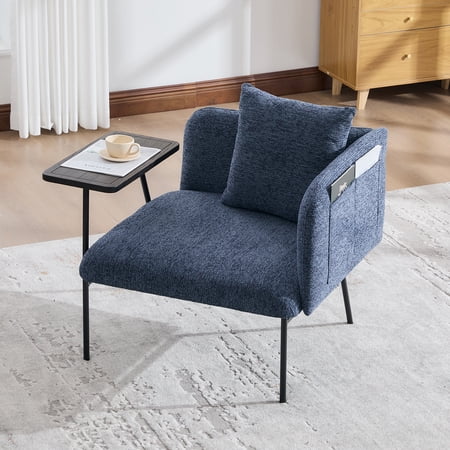
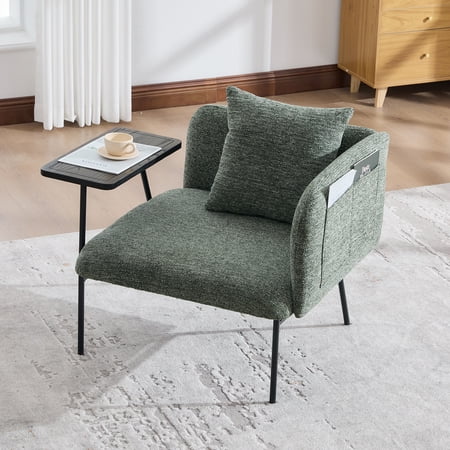
Imagine having a comfortable place to sit and a sturdy surface for your laptop, textbook, or lunch—all in one compact unit. That's the simple genius of an office chair with table attached. It's a hybrid piece of furniture that acts as both your seat and your desk, making it an incredibly smart solution for anyone dealing with limited square footage.
Whether you're a student in a cramped dorm room, a remote worker setting up a home office in a corner of the living room, or someone who just needs a flexible workstation, these chairs offer a unique blend of convenience and functionality. They eliminate the need for a separate desk, freeing up valuable floor space while still providing an ergonomic place to work.
Space-Saving Insight: In a typical 100 sq. ft. dorm room or studio apartment, a separate desk and chair can consume up to 15-20 sq. ft. An office chair with an attached table can reduce that footprint by nearly 50%, giving you room to breathe.
Navigating the World of Chair-Desk Combos: A Detailed Breakdown
Not all "office chairs with table attached" are created equal. They range from simple, budget-friendly student models to more robust, ergonomic designs suitable for daily professional use. Understanding the nuances will help you make the right choice.
1. Types of Attached Table Mechanisms
The way the table is attached and functions is a primary differentiator. Here are the most common designs you'll encounter:
- Fixed Attached Table: The table is permanently fixed to the chair's arms or frame. This is the most stable option but least flexible. It's ideal for dedicated study or workstations where you won't need to move the chair away from the table.
- Flip-Up / Fold-Away Table: This is the most popular design. The table is hinged and can be flipped up and out of the way when not in use, allowing you to sit in the chair like a regular seat. Look for a secure locking mechanism to prevent accidental folding.
- Swivel-Arm Table: The table is attached to an arm that can swivel in front of you or to the side. This offers great flexibility, allowing you to easily get in and out of the chair or use the table only when needed.
- Laptop Tray Style: Often a smaller, adjustable surface that attaches to the chair's armrests. It's more of an add-on accessory than a built-in table, offering less stability but maximum adjustability for angles and distance.
2. Ergonomic Considerations for All-Day Comfort
Early models of these chairs were often basic, but modern versions incorporate significant ergonomic features. If you plan to sit for more than an hour, prioritize these:
- Lumbar Support: A contoured backrest or an adjustable lumbar cushion is crucial to maintain the natural S-curve of your spine and prevent lower back fatigue.
- Seat Depth and Padding: Look for a seat with high-density foam that doesn't flatten out quickly. A "waterfall edge" (where the front of the seat curves down) helps improve circulation in your legs.
- Adjustable Height: Pneumatic gas lift adjustment is standard. Ensure the height range allows you to sit with your feet flat on the floor and your thighs parallel to the ground.
- Material Breathability: For long hours, a mesh backrest or a breathable fabric upholstery is preferable to bonded leather, which can trap heat and become uncomfortable.
3. Materials and Build Quality
Durability is key, as the chair must support your weight and the weight of items on the table. Here’s a quick comparison of common materials:
Frame & Base
- Nylon/Plastic Base: Lightweight and cost-effective, suitable for lighter users and occasional use.
- Metal Base (Steel/Aluminum): Highly recommended. Offers superior stability and higher weight capacity, ensuring the chair doesn't tip when you lean on the table.
- Casters: Look for dual-wheel casters that roll smoothly on carpets or hardwood floors. Brakes on casters can be a bonus for extra stability when the table is in use.
Table Surface
- ABS Plastic: Lightweight, impact-resistant, and easy to clean. A common and practical choice.
- MDF with Laminate: Offers a more "furniture-like" look. It's sturdy but heavier and can be damaged by moisture. The laminate provides a smooth writing surface.
- Metal: Extremely durable and sleek-looking, but can be heavy and more expensive. Often found on premium models.
- Edge Detail: A raised lip or edge on the table prevents items like pens or a mouse from sliding off.
4. Who Is This Chair Perfect For? (Usage Scenarios)
The versatility of these chairs makes them suitable for a variety of situations. Let's break it down:
Ideal for dorms where space is a premium. Perfect for studying on a laptop, writing notes, or even having a meal.
Create a functional workspace in a corner of the bedroom or living room without the bulk of a full desk.
In a guest room or craft room, this chair provides seating and a workspace that can be tucked away or used as needed.
For browsing, paying bills, or light administrative work at home, it's a comfortable and practical solution.
In a child's bedroom or a library corner, it offers a dedicated spot for reading and drawing.
5. Step-by-Step Selection Guide
Follow these steps to ensure you pick the right chair for your needs.
- Step 1: Measure Your Space: Note the width and depth available. Remember to account for the space needed to swivel or push back from the table.
- Step 2: Define Your Primary Use: Is it for heavy daily study (opt for a flip-up table and metal base), or just occasional use (a simpler model may suffice)?
- Step 3: Check Weight Capacity: Add your weight to the expected weight of items on the table (laptop, books). Choose a chair with a capacity at least 20% higher than this total.
- Step 4: Test the Table Mechanism (if possible): Ensure the table locks securely and doesn't wobble. Check its size—is it big enough for your laptop and a mouse?
- Step 5: Prioritize Ergonomic Adjustments: Ensure seat height is adjustable. Look for optional lumbar support if you have back concerns.
Think of it like a "convertible car" for your workspace: It serves a primary function (seating) but can transform to provide an additional, crucial feature (a work surface) exactly when you need it, without permanently taking up extra room. It's all about intelligent, flexible design.
Frequently Asked Questions About Office Chairs with Attached Tables
Conclusion: Is an Office Chair with an Attached Table Right for You?
An office chair with table attached is more than just a novelty; it's a practical, space-efficient solution for modern living. It bridges the gap between comfort and functionality, proving that you don't always need a sprawling desk to be productive.
If your primary challenge is a lack of space, or if you need a flexible workstation that can adapt to different tasks, this hybrid chair is an excellent investment. By focusing on key features like a sturdy base, a secure table mechanism, and essential ergonomic support, you can find a model that serves you well for years. It's a small piece of furniture that makes a big difference in how you utilize your space.