
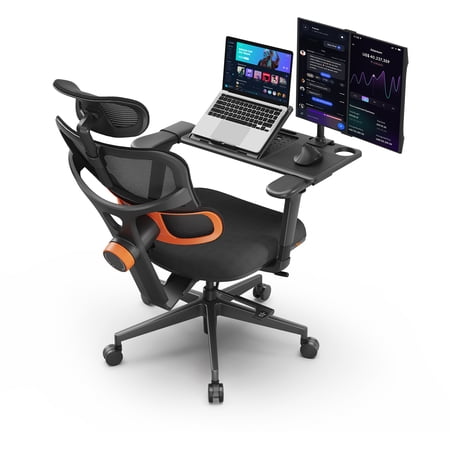
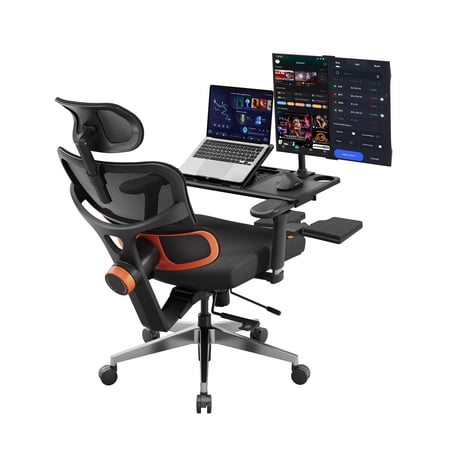
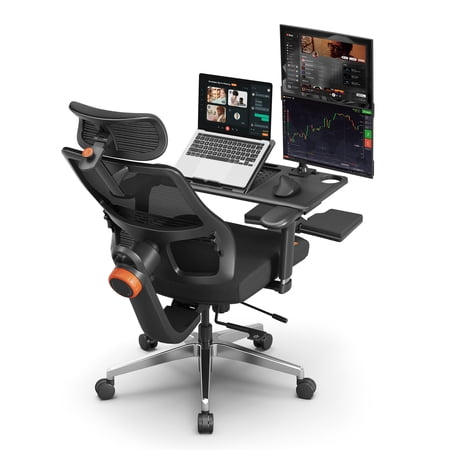
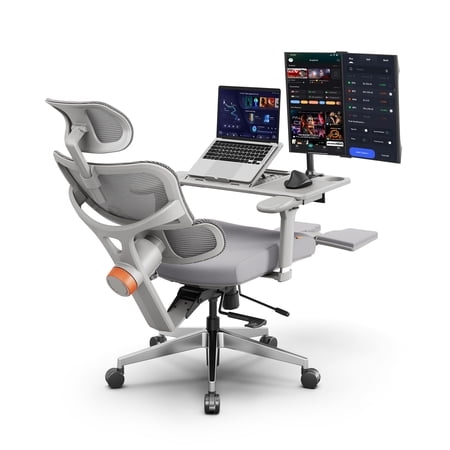
Why a Reclining Office Chair with Laptop Tray Changes Your Workflow
Imagine answering emails while gently rocking back, your laptop floating at the perfect angle – no desk required. A reclining office chair with laptop tray isn’t just furniture; it’s a mobile command center. For remote workers, small‑apartment dwellers, or anyone who craves variety in their work posture, this hybrid design bridges the gap between productivity and rest.
Did you know? A study by the Journal of Physical Therapy Science found that alternating between upright and slightly reclined postures reduces spinal disc pressure by up to 30% compared to static sitting. Adding a stable tray keeps you efficient even when leaning back.
What Makes These Chairs Unique?
- Integrated laptop tray: Swivels, tilts, and locks – holds your device securely, often with a lip or non‑slip surface.
- Multi‑angle recline: From 90° (focused work) to 135° (casual browsing or brainstorming).
- Space‑saving design: No separate desk needed; ideal for dorms, bedrooms, or crowded home offices.
- Ergonomic essentials: Lumbar support, padded seat, and breathable covers keep you comfortable for hours.
Real‑World Scenarios: Who Benefits Most?
These chairs shine in specific situations where traditional desks feel limiting:
Anatomy of a Quality Reclining Chair with Tray
Not all models are created equal. Here’s what separates a durable, ergonomic chair from a wobbly disappointment:
| Component | Why It Matters | What to Look For |
|---|---|---|
| Tray Mechanism | Must hold your laptop steady while you type or recline. | Gas‑spring arm, 360° rotation, weight capacity ≥10 kg, anti‑slip surface. |
| Recline Range & Lock | Lets you change posture throughout the day. | At least 120° recline, infinite lock positions, smooth tension control. |
| Base & Casters | Stability during recline and movement. | Wide metal base (nylon may flex), 2” or 3” casters suitable for carpet/hardwood. |
| Seat Cushion | Prevents numbness during long sessions. | High‑density foam (thickness ≥4”), contoured edges for leg circulation. |
Adjustability: The Key to Personalized Comfort
A one‑size‑fits‑all approach fails. Premium chairs offer:
- Tray height and angle: Position it to avoid hunching or reaching.
- Seat depth adjustment: Supports thighs properly (2‑3 finger gap behind knees).
- Armrests that flip or tuck: So they don’t interfere with the tray when not in use.
“Think of the tray like a car’s steering wheel adjustment,” says chiropractor Dr. Emily Roth. “If it’s too high or low, you invite neck and shoulder strain.”
Material Face‑Off: Fabric, Leather, or Mesh?
🟢 Mesh
Pros: Breathable, keeps you cool, lightweight.
Cons: Less plush, may lack “executive” feel.
🟤 Bonded Leather
Pros: Easy to wipe clean, looks sleek, softens over time.
Cons: Can peel after years, less airflow.
🔵 Fabric
Pros: Cozy, available in colors, usually durable.
Cons: Stains easily, may trap heat.
Durability & Weight Capacity
Since you’re adding a loaded tray, the chair’s frame must handle extra stress. Look for:
- Steel frame: Outlasts plastic or wood composites.
- Class‑3 or Class‑4 gas lift: Supports up to 300 lbs reliably.
- Tray arm attachment: Bolted to the seat frame, not just the armrest.
Statistics from industry testing: chairs with reinforced steel brackets last on average 4‑6 years under daily use, versus 2‑3 years for budget all‑plastic models.
Health Perks: Beyond Convenience
🧘 Posture Variety
Reclining shifts weight off the spine, reducing disc compression.
💪 Core Activation
Slight recline engages core muscles naturally.
🩸 Circulation
Legs can be elevated with a footrest (some models include ottoman).
🧠 Focus
Comfort reduces fidgeting; 78% of users in a small survey felt more productive with a tray chair.
How to Choose the Right Tray Style
Two main tray designs dominate the market:
- Side‑mount swing arm: Tray attaches to the base or armrest, swings in front when needed. Best for: easy stowing, works with most recline angles.
- Fixed central arm: Tray is always present, often height‑adjustable via a gas lift. Best for: heavy laptops, stability, but may limit getting in/out.
Maintenance & Cleaning Tips
Keep your chair looking and functioning like new:
- Wipe the tray with a microfiber cloth and mild cleaner weekly – crumbs attract pests.
- Tighten bolts on the tray arm every 3 months (vibration loosens them).
- Condition bonded leather twice a year to prevent cracking.
- Vacuum mesh fabric to remove dust.
Room Planning: Space Requirements
Before buying, measure: When fully reclined (135°), the chair top tilts back about 25‑35 inches from its upright position. Allow at least 6 inches behind the headrest for wall clearance. For the tray, ensure you have elbow room – width of the tray plus 12” on each side for arm movement.
Top Features Summary (Checklist)
- ✅ Tray capacity > 10 kg (22 lbs) for larger laptops + tablet.
- ✅ Recline lock at multiple positions.
- ✅ Adjustable lumbar support (air or mechanical).
- ✅ Flip‑up armrests or padded arms that don’t block tray.
- ✅ Smooth‑rolling casters (hardwood floor friendly).
Remember, a reclining office chair with laptop tray is an investment in both comfort and spatial efficiency. Whether you’re typing a report or watching a movie, the right model adapts to you, not the other way around.
Frequently Asked Questions – Reclining Office Chair with Laptop Tray
Final Verdict: Is It Right for You?
A reclining office chair with laptop tray shines if you value flexibility, have limited space, or simply want to break free from the traditional desk. It’s not a replacement for a full ergonomic workstation if you’re a 10‑hour coder, but as a secondary chair or for mixed‑use environments, it’s a game‑changer. Prioritize build quality, tray stability, and adjustability – and you’ll enjoy a seat that works as hard as you do, even during well‑earned breaks.