
Why Your Office Chair Needs Integrated Back and Neck Support
Think of your spine as a suspension bridge. The cables (muscles and ligaments) work constantly to keep the structure stable. Now imagine that bridge without its main support towers—that's what happens to your spine when you sit for 8+ hours in a chair lacking proper back and neck support. The muscles overwork, leading to fatigue, pain, and long-term damage.
The Alarming Statistics: According to the American Chiropractic Association, 80% of the population will experience back pain at some point in their lives, with office workers being 3x more likely to suffer from neck pain than the general population. A study in the Journal of Physical Therapy Science found that using an ergonomic chair with proper lumbar and cervical support reduces spinal muscle fatigue by 62% and improves productivity by up to 43%.
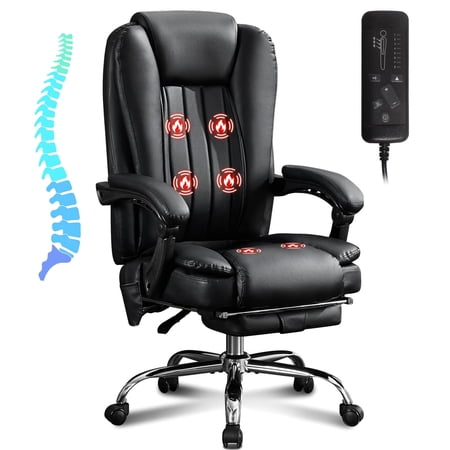
An office chair with back and neck support isn't just a comfort feature—it's a health necessity. These specialized chairs are engineered to maintain the spine's natural S-curve, prevent forward head posture (often called "text neck"), and distribute body weight evenly to eliminate pressure points. Whether you're a remote worker, a corporate executive, or someone recovering from a spinal injury, understanding what makes these chairs effective is the first step toward a pain-free workday.
Understanding Spinal Support: The Science Behind the Chair
Before diving into chair features, it's crucial to understand what "support" actually means for your spine. The human spine has three natural curves: cervical (neck), thoracic (mid-back), and lumbar (lower back). An effective office chair must address all three.
🔹 Lumbar Support (Lower Back)
The lumbar region bears the most weight when sitting. Without proper support, you slump, flattening the natural inward curve. This increases disc pressure by up to 40%. Quality chairs offer height-adjustable and depth-adjustable lumbar support to fill the gap between your lower back and the chair.
🔹 Thoracic Support (Upper Back)
The mid-back is often neglected. A chair with a tall backrest (at least 20-22 inches) provides continuous contact along the thoracic spine, encouraging you to sit upright rather than hunching forward, which compresses the rib cage and restricts breathing.
🔹 Cervical Support (Neck)
The average head weighs 10-12 pounds. For every inch your head moves forward, the weight on your cervical spine doubles. At 3 inches forward, your neck muscles support 30+ pounds. A properly adjusted headrest reduces this strain, preventing tension headaches and chronic neck pain.
The Domino Effect: How One Misalignment Causes Widespread Pain
Imagine your spine as a chain of dominos. When your lower back lacks support and you slump (lumbar misalignment), your shoulders round forward (thoracic compensation), and your head juts out to look at the screen (cervical strain). This cascade is why a chair that only supports your lower back but ignores your neck is incomplete. An office chair with back and neck support works synergistically—proper lumbar support encourages a neutral pelvis, which aligns the thoracic spine, allowing the headrest to gently support the neck without pushing it forward.
8 Non-Negotiable Features of a Quality Support Chair
Not all chairs claiming "back and neck support" deliver. Here's a detailed breakdown of what to look for:
| Feature | Why It Matters | What to Look For |
|---|---|---|
| Adjustable Lumbar Support | Spinal curves vary by height and gender. Fixed lumbar bumps hit the wrong spot for many people. | Independent height adjustment (2-4 inches) and depth adjustment (in/out movement of the pad). |
| 3-Way Adjustable Headrest | A headrest that's too low pushes your head forward; one too high is useless. | Adjustable height (at least 3 inches), tilt angle (0-30 degrees), and sometimes depth. |
| Seat Depth Adjustment | Proper seat depth (2-4 finger gap behind knees) ensures thighs are supported without cutting off circulation. | Slide mechanism with at least 2 inches of travel. |
| Synchronized Recline | Maintains visual contact with your screen as you recline, preventing neck strain. | Chair back and seat move in a 2:1 or 3:1 ratio with tension adjustment. |
| 4D Armrests | Arms support shoulders; poorly placed armrests cause shrugging or reaching. | Height, width, depth, and pivot angle adjustments. |
| Waterfall Seat Edge | Reduces pressure behind the knees, promoting better circulation. | Soft, downward-curving front edge with breathable foam. |
| Breathable Back Material | Prevents heat buildup that causes fidgeting and poor posture shifts. | High-tension mesh or perforated fabric with good tension. |
| Weight Capacity & Stability | Safety and durability; under-rated chairs flex and fail over time. | Minimum 275-300 lbs for standard; 400+ lbs for heavy-duty models. |
Mesh vs. Fabric vs. Leather: What's Best for Support?
The material of your chair directly impacts how well it supports your back and neck over long periods.
High-Tension Mesh
- Best For: Lumbar support and breathability
- Support Quality: Excellent tension conforms to spine shape
- Durability: Good (7-10 years) but can sag if low quality
- Ideal Climate: Warm environments, all-day users
- Price Range: $300-$1,000
Recommendation: Look for mesh with "zonal tensioning"—tighter in lumbar, looser in upper back for comfort.
High-Density Foam (Fabric)
- Best For: Plush comfort, pressure relief
- Support Quality: Good initial support, may break down faster
- Durability: Medium (5-8 years) depending on foam density
- Ideal Climate: Cooler offices, shorter sitting sessions
- Price Range: $200-$700
Recommendation: Choose "memory foam" or "cold-cure foam" with at least 2.5 lb density for longevity.
Premium Leather
- Best For: Executive settings, durability, easy cleaning
- Support Quality: Firm, consistent support
- Durability: Excellent (10-15+ years) with maintenance
- Ideal Climate: Climate-controlled offices
- Price Range: $600-$2,500
Recommendation: Look for "top-grain" leather with perforations for some breathability.
Step-by-Step Guide: How to Adjust Your Chair for Perfect Support
Even the best office chair with back and neck support fails if incorrectly adjusted. Follow this sequence:
- Seat Height: Adjust so feet flat on floor, knees at 90-degree angle. Thighs parallel to ground.
- Seat Depth: Slide forward/back so you have 2-3 finger widths between back of knee and seat edge.
- Lumbar Support Height: The peak of lumbar curve should hit your belt line. Adjust up/down to fit.
- Lumbar Support Depth: Increase depth until you feel gentle pressure supporting the natural curve, not pushing you forward.
- Backrest Recline Tension: Adjust so you can recline comfortably without feeling like you're falling back.
- Headrest Height: Position so the center of the headrest supports the base of your skull (occipital bone).
- Headrest Angle: Tilt slightly back (10-15°) to support natural cervical curve without jutting head forward.
- Armrests: Adjust so shoulders are relaxed, elbows at 90°, wrists straight.
Pro Tip: Take a photo of yourself from the side while sitting in your adjusted chair. Your ear, shoulder, and hip should align vertically. If your ear is forward of your shoulder, your neck is straining—adjust the headrest or recline.
Matching Chair Features to Specific Pain Conditions
| Condition | Key Symptoms | Chair Features to Prioritize | Features to Avoid |
|---|---|---|---|
| Lower Back Pain (Lumbar) | Aching in lower spine, stiffness after sitting | Independent lumbar depth adjustment, firm support, waterfall seat edge | Fixed lumbar bump, shallow seat pan |
| Upper Back Pain (Thoracic) | Pain between shoulder blades, rounded shoulders | Tall backrest (22"+), adjustable back support tension | Low-back chairs, overly soft backs |
| Neck Pain / Cervical Strain | Stiff neck, tension headaches, shoulder knot | 3-way adjustable headrest, synchro-tilt recline | Fixed headrest, chairs without headrest |
| Sciatica / Piriformis Syndrome | Shooting pain down leg, buttock pain | Waterfall seat edge, adjustable seat depth, proper lumbar curve | Bucket seats, hard seat edges |
| Herniated Disc | Sharp pain with certain movements, numbness | Excellent lumbar support, recline function to change position, quality foam | Hard surfaces, minimal padding |
Is a Premium Chair Worth the Investment? A Cost-Benefit Analysis
Let's do the math. A quality office chair with back and neck support priced at $800 might seem expensive, but consider the alternative:
- Medical Costs: A single chiropractic visit averages $65. Weekly visits for chronic pain = $3,380/year.
- Physical Therapy: $75-$150 per session. A 12-week program = $900-$1,800.
- Lost Productivity: Pain reduces focus by an estimated 30%. For a $60,000/year employee, that's $18,000 in lost value.
- Over-the-Counter Relief: Pain meds, heating pads, cushions: $200-$500/year.
Even a conservative estimate shows that a poor chair can cost you $2,000-$5,000 annually in direct and indirect costs. A $1,000 chair that lasts 8 years costs $125/year—a fraction of the potential medical bills. It's not an expense; it's an investment in your most valuable asset: your health.
Price Tiers Explained
Prolonging the Life of Your Chair's Support Features
A chair's support mechanisms can wear out. Here's how to maintain them:
- Clean Mechanisms: Dust and debris can clog gas lifts and tilt mechanisms. Vacuum around moving parts monthly.
- Tighten Bolts: Every 6 months, check and tighten all visible bolts, especially where the back attaches to the seat.
- Condition Leather: Leather dries and cracks, losing its supportive tension. Use leather conditioner every 3-4 months.
- Mesh Tension: If mesh sags, it's time for replacement—support is compromised.
- Lubricate: Use silicone spray on moving metal parts (never on gas lift) if they squeak.
- Weight Limits: Never exceed the rated weight capacity—this stresses the lumbar mechanism.
Frequently Asked Questions About Office Chairs With Back and Neck Support
Conclusion: Your Path to Pain-Free Sitting
Choosing the right office chair with back and neck support is one of the most significant health decisions you'll make for your professional life. It's not about buying a piece of furniture; it's about investing in a tool that protects your body's most critical structure—your spine.
Remember these key takeaways:
- Look for independent adjustability in both lumbar and headrest areas. One-size-fits-all support rarely works.
- Material matters: Mesh for breathability and active support, high-density foam for plush comfort, leather for durability and aesthetics.
- Proper adjustment is as important as the chair itself. Follow the step-by-step guide and reassess every few months.
- Consider your specific pain points—lower back, upper back, or neck—and prioritize features that address them.
- View the cost as an investment. A quality chair pays for itself by preventing medical bills and lost productivity.
The best chair is the one that disappears—meaning you're so comfortable and well-supported that you forget you're sitting. When your chair works in harmony with your body's natural curves, you can focus entirely on your work, not your aching back or stiff neck. Start your search armed with this knowledge, test chairs when possible, and prioritize your long-term spinal health. Your future self will thank you.