
Your Chair’s Adjustment Points: the difference between discomfort and all‑day energy
Imagine wearing a pair of shoes that are half a size too small – you wouldn’t make it through the afternoon without aching feet. The same logic applies to your office chair. When the armrests are too high or the lumbar curve misses your lower back, your body compensates with tension, slouching, and eventually pain. An office chair with adjustable arms and lumbar support eliminates that mismatch. It’s the difference between a chair you simply sit on and a chair that actively supports your work rhythm.
According to the Occupational Safety and Health Administration (OSHA), poorly adjusted seating contributes to musculoskeletal disorders that cost U.S. businesses over $20 billion annually. On a personal level, it means lost focus and reduced energy. In this guide, we’ll explore why these two adjustments matter most, how to use them correctly, and what to look for when shopping – so you can sit smarter, not harder.
The Anatomy of Adjustability: arms & lumbar deconstructed
Not all adjustable arms and lumbar supports are created equal. To make an informed choice, you need to understand the layers of customization available. Let’s break them down.
1. Adjustable armrests – more than just up and down
Basic chairs offer height‑only armrests. But for true ergonomic fit, consider these dimensions:
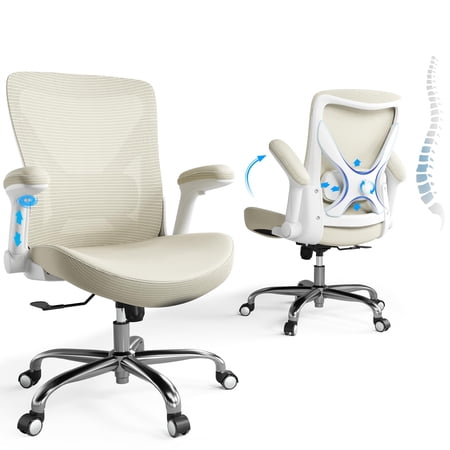
- Height adjustment (2D): Raises or lowers to keep your elbows at a 90° angle, shoulders relaxed. Essential for avoiding neck strain.
- Width adjustment (3D): Moves armrests closer together or farther apart – crucial if you’re narrow‑shouldered or broad‑chested.
- Depth / forward‑backward adjustment (4D): Allows the arm pad to slide so it supports your forearm when you’re typing or leaning back. Prevents “reaching” for the rest.
- Pivot / angle adjustment: Some high‑end chairs let the arm pad tilt to match your natural hand position.
A office chair with adjustable arms that includes at least height and width (3D) gives you a personalised fit for 90% of tasks. If you’re a multi‑tasker who switches between typing and reading, consider 4D armrests.
2. Lumbar support – the spine’s best friend
The lumbar region (lower back) has a natural inward curve. When you sit for hours, that curve tends to flatten, leading to slouching and disc pressure. Adjustable lumbar support restores the curve. There are three common mechanisms:
- Height‑adjustable lumbar: A pad that moves up and down inside the backrest. This is vital because people have different torso lengths. The support should hit the widest part of your lower back curve.
- Depth‑adjustable lumbar: A knob or lever that pushes the lumbar support forward (more aggressive curve) or lets it recede. Great for fine‑tuning how much “push” you feel.
- Air lumbar (bladder): Inflatable air chambers inside the backrest. You pump air to increase support or release to soften. Provides infinite micro‑adjustments.
For an office chair with adjustable arms and lumbar support, the sweet spot is a chair that combines 3D or 4D arms with at least height‑adjustable lumbar. Depth control is a bonus that turns a good chair into a great one.
Data insight: A study published in the journal Applied Ergonomics found that participants using chairs with independently adjustable lumbar and armrests reported 34% less perceived discomfort after a full workday compared to those using fixed‑feature chairs.
3. How to adjust them – a quick step‑by‑step
Even the best adjustments are useless if you don’t set them correctly. Here’s a 2‑minute routine:
- Sit fully back in the chair with your feet flat on the floor.
- Adjust seat height so your thighs are parallel to the ground, knees at 90°.
- Set armrest height so your elbows rest comfortably at 90°, shoulders down. Your forearms should be parallel to the floor.
- Adjust armrest width so they sit close to your body without pressing into your ribs.
- Find the lumbar height – slide the support so the firmest part contacts the inward curve of your lower back (usually just above your belt line).
- Set lumbar depth – increase until you feel a gentle support, not a hard poke. You should still be able to slide your hand behind your back with slight resistance.
Spend a minute re‑adjusting whenever you feel discomfort – our bodies change throughout the day.
4. Why this combo matters for remote workers and hybrid offices
With the rise of home workspaces, many people use kitchen chairs or cheap static seating. An office chair with adjustable arms and lumbar support becomes your portable ergonomic station. Whether you’re in a corporate cubicle or a home office corner, you can recreate a healthy sitting posture. Moreover, these chairs often accommodate multiple users (family members sharing a workspace) because adjustments make the chair re‑personalizable in seconds.
Think of adjustable arms and lumbar like the focus ring on a camera. A fixed lens can take pictures, but without fine focus, they’ll always be slightly blurry. Adjustability brings the image (your comfort) into sharp clarity.
5. Materials and durability – what to expect
Chairs with many moving parts need robust construction. Look for:
- Gas lift cylinders from reputable brands (Class 3 or 4) for smooth height changes.
- Metal armrest frames rather than all‑plastic – they withstand repeated adjustments.
- Lumbar mechanisms that feel solid, not flimsy. Test by applying gentle pressure; they should hold position.
- Upholstery that won’t wear where adjustments slide – reinforced stitching at stress points.
Most quality chairs with these features come with a 5‑ to 10‑year warranty on mechanisms. That’s a good indicator of expected lifespan.
Quick reference: adjustment levels & benefits
| Adjustment type | What it does | Ideal for |
|---|---|---|
| 2D arms (height only) | Raises/lowers arm pads | Basic ergonomics, budget pick |
| 3D arms (height + width) | Also moves side‑to‑side | Most body types, shared chairs |
| 4D arms (height + width + depth + pivot) | Full customization | Power users, specific tasks |
| Height‑adjustable lumbar | Moves support up/down | Different torso lengths |
| Depth‑adjustable lumbar | Increases/decreases curve pressure | Personalized firmness, back pain relief |
6. Common myths about adjustable chairs
- “More adjustments always mean better quality.” Not exactly. Cheap chairs may have many levers that break. Look for smooth operation and solid materials.
- “I set it once and forget it.” Your body changes, tasks change. Re‑adjust periodically.
- “Lumbar support is only for people with back pain.” It’s preventive for everyone. Think of it like wearing a seatbelt even if you’re a good driver.