
The Complete Guide to Office Chair Arms: Types, Adjustability, and Ergonomics
Imagine driving a car where you couldn't adjust the steering wheel or mirrors to fit your body. You'd feel cramped, uncomfortable, and probably develop aches after a short time. The same principle applies to your office chair's arms. Office chair arms are the unsung heroes of workplace ergonomics—they support your upper body, reduce shoulder tension, and help maintain proper typing posture. Yet most people overlook them until something goes wrong.
Whether you're shopping for a new chair, looking to replace broken arms, or simply trying to understand why your current armrests feel uncomfortable, this comprehensive guide covers everything about office chair arms. We'll explore the different types of armrests, how adjustability affects your comfort, replacement options, and the science behind proper arm positioning. According to ergonomic research from the Human Factors and Ergonomics Society, proper arm support can reduce upper body muscle fatigue by up to 40% during an 8-hour workday.
Ergonomic Insight: Your armrests should support approximately 20-25% of your arm's weight. When properly adjusted, they take pressure off your shoulders and neck, allowing your trapezius muscles to relax. This simple adjustment can prevent chronic tension headaches and reduce the risk of developing thoracic outlet syndrome, a condition affecting nerves and blood vessels between your neck and shoulder.
Understanding Office Chair Arms: Beyond Basic Support
Office chair arms have evolved dramatically over the past decade. What was once a simple fixed piece of plastic or padded metal has transformed into sophisticated ergonomic components with multiple adjustment points. To make an informed decision about your office seating, you need to understand the anatomy of modern armrests and how each feature contributes to your daily comfort.
The Anatomy of Office Chair Arms
Before diving into types and adjustments, let's break down the components that make up a typical office chair armrest:
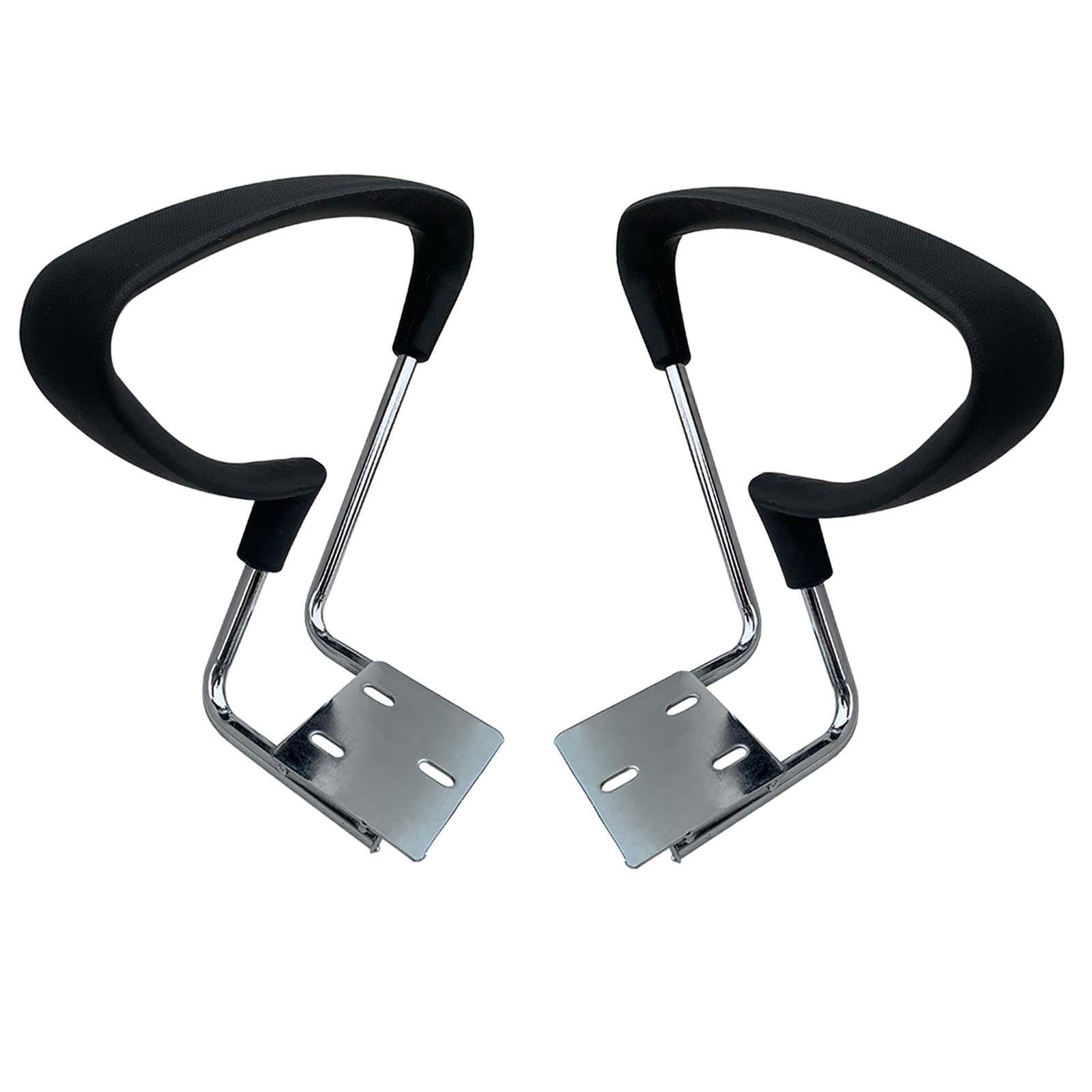
- Arm Pad: The top surface where your arm rests. Materials range from hard plastic to soft polyurethane foam, memory foam, or gel-infused padding. Pad width typically ranges from 2.5 to 4 inches.
- Arm Post/Column: The vertical support connecting the pad to the chair. This may contain height adjustment mechanisms.
- Mounting Bracket: The component that attaches the arm to the chair frame. Mounting types include side-mount (attaches to chair side), under-mount (attaches beneath seat), and chair-back mount.
- Adjustment Mechanisms: Buttons, levers, or releases that control movement (height, width, pivot, etc.).
- Covering Material: The outer layer—fabric, leather, vinyl, or textured plastic that contacts your skin.
Five Types of Office Chair Arms: From Basic to Premium
Office chair arms exist on a spectrum from completely fixed to fully customizable. Understanding these categories helps you match the right armrests to your work style and budget.
Fixed Armrests
Best for: Basic task chairs, guest seating, or budget-conscious buyers.
Fixed arms are permanently positioned with no adjustability. They're molded into the chair frame or bolted at a predetermined height and width. While simple and durable, they rarely fit all body types perfectly. If they're too high, they force shoulder elevation; too low, and you'll slump.
Durability: ⭐⭐⭐⭐⭐ | Ergonomics: ⭐⭐Height-Adjustable Armrests
Best for: Multi-user environments, shared workspaces.
The most common upgrade from fixed arms. These allow vertical adjustment, typically 3-5 inches of range. A button or lever releases the mechanism, letting you raise or lower the armrest. This accommodates different torso lengths and desk heights but doesn't address width or angle preferences.
Durability: ⭐⭐⭐⭐ | Ergonomics: ⭐⭐⭐2D Adjustable Armrests
Best for: Most office workers seeking good ergonomics.
2D armrests offer two adjustment dimensions: height and width (side-to-side movement). Width adjustment lets you position arms closer to your body, which is crucial for narrow-shouldered individuals or those who prefer a more tucked-in position. Width adjustment typically ranges 1-2 inches inward/outward.
Durability: ⭐⭐⭐⭐ | Ergonomics: ⭐⭐⭐⭐3D Adjustable Armrests
Best for: Power users, those with specific ergonomic needs.
3D armrests add a third dimension: depth adjustment or pivot. Depth adjustment moves the arm pad forward or backward, accommodating different forearm lengths. Pivot adjustment allows the pad to angle inward or outward, following the natural angle of your forearms when typing. This prevents wrist ulnar deviation.
Durability: ⭐⭐⭐ | Ergonomics: ⭐⭐⭐⭐⭐4D Adjustable Armrests
Best for: Executive chairs, premium ergonomic seating.
The pinnacle of armrest technology. 4D armrests offer height, width, depth, and angle adjustment. Some premium models also include articulating arm pads that follow arm movement or width adjustment that extends/retracts horizontally. These provide maximum personalization but come at a higher price point ($200+ premium over fixed arms).
Durability: ⭐⭐⭐ | Ergonomics: ⭐⭐⭐⭐⭐+Flip-Back/Fold-Away Arms
Best for: Multi-purpose chairs, small spaces, gaming chairs.
These arms pivot upward or backward to get completely out of the way when not needed. Ideal for chairs used for both work and relaxation, or when you need to slide the chair under a desk for storage. Common in gaming chairs and space-saving office designs.
Durability: ⭐⭐⭐ | Ergonomics: ⭐⭐ (when down) / N/A (when flipped)Why Armrest Adjustability Matters: The Ergonomic Case
The human body isn't one-size-fits-all, yet many office chairs treat it that way. Your arm length, shoulder width, and preferred sitting posture are unique. Here's how different adjustments address specific ergonomic needs:
How Each Adjustment Affects Your Body
1 Height Adjustment: When your armrests are at the correct height (elbows at 90°, shoulders relaxed), your trapezius muscles can relax. Incorrect height forces shoulders to elevate (too high) or slump forward (too low), leading to neck tension within 1-2 hours.
2 Width Adjustment: Armrests should be positioned directly under your elbows, not splayed outward. Too wide, and you'll abduct your shoulders (winging out). Too narrow, and you'll compress your torso. Proper width maintains neutral shoulder position.
3 Depth/Pivot Adjustment: Your forearms naturally angle slightly inward when typing (pronation). Fixed flat armrests force wrists into ulnar deviation—bending toward your pinky finger. Angled or pivoting armrests follow your forearm's natural position, keeping wrists straight and reducing carpal tunnel pressure.
4 Padding Material: Beyond adjustments, the arm pad material affects pressure distribution. A study in the International Journal of Industrial Ergonomics found that gel-infused memory foam reduced peak pressure on the ulnar nerve by 35% compared to standard foam, potentially reducing numbness and tingling.
When Armrests Cause More Harm Than Good
Despite their benefits, armrests can become problematic if used incorrectly. Here are situations where armrests might be working against you:
- Leaning on one armrest: If you habitually lean to one side while using armrests, you create spinal asymmetry that can lead to scoliotic curves over time. The solution: ensure both armrests are at identical heights and consciously use them equally.
- Armrests that prevent chair tucking: If your armrests hit the desk edge before you can pull in close, you'll lean forward, losing back support. Flip-up arms or chairs with adjustable width can solve this.
- Over-reliance during typing: Armrests should support arms during micro-breaks, not during active typing. Resting forearms on armrests while typing forces wrist extension and can increase carpal tunnel pressure. Let arms float freely while typing, then rest periodically.
- Armrests that are too soft: Excessively plush padding may feel comfortable initially but can destabilize your arms, causing micro-adjustments that fatigue muscles over time. Moderate firmness with conforming properties (like memory foam) provides the best balance.
Replacement and Upgrade Options for Office Chair Arms
Perhaps your current chair is perfect except for worn-out or uncomfortable arms. Good news: you can often replace or upgrade them without buying a whole new chair. Here's your comprehensive guide to armrest replacement:
When to Consider Replacement
- • Cracked or broken armrest frames
- • Worn-out padding that no longer provides comfort
- • Torn or peeling upholstery
- • Malfunctioning adjustment mechanisms (won't stay in position)
- • Upgrading from fixed to adjustable arms for better ergonomics
Types of Replacement Arms
| Replacement Type | Best For | Cost Range | Installation Difficulty |
|---|---|---|---|
| OEM Manufacturer Arms | Exact match for your chair model | $40-$150 per arm | Easy (direct bolt-on) |
| Universal Replacement Arms | Upgrading or replacing when OEM unavailable | $30-$80 per pair | Moderate (may require drilling) |
| Bolt-On Arm Pads (Top Only) | Worn padding but intact frame | $15-$40 per pair | Very Easy |
| Slip-On Arm Covers/Pads | Adding cushion to hard arms | $10-$25 per pair | Easiest (no tools) |
| Aftermarket Upgrade Kits | Converting fixed arms to adjustable | $60-$150 per kit | Moderate to Hard |
How to Measure for Replacement Arms
Getting the right replacement arms requires accurate measurements. Here's a step-by-step approach:
- Identify mounting type: Look underneath your chair. Are arms bolted to the side of the backrest, to the seat pan sides, or underneath the seat? Take photos from multiple angles.
- Measure bolt hole pattern: Measure center-to-center distance between mounting holes. Common patterns: 2-hole with 2.75" or 3.5" spacing; 3-hole triangular pattern; 4-hole rectangular pattern.
- Count bolts and note thread type: Most use 1/4"-20 or M6 metric threads. A trip to the hardware store with your bolt can identify thread pitch.
- Measure arm pad dimensions: Length, width, and thickness. Also note if the pad is curved or flat.
- Check clearance: Ensure replacement arms won't interfere with chair mechanisms or desk when installed.
Armrest Materials: Comfort vs. Durability
The material covering your armrests significantly affects both comfort and longevity. Here's how common materials compare:
| Material | Comfort | Durability | Maintenance | Best Use Case |
|---|---|---|---|---|
| Hard Plastic | Poor (no give) | Excellent | Wipe clean | Budget chairs, occasional use |
| Standard Foam + Fabric | Good | Good (3-5 years) | Vacuum, spot clean | General office use |
| Memory Foam + Fabric | Excellent (conforms) | Good (3-4 years) | Spot clean only | Extended sitting, pressure relief |
| Gel-Infused Foam | Excellent + cooling | Good (3-4 years) | Wipe clean | Warm climates, long hours |
| Polyurethane (PU) Leather | Good | Fair (2-3 years, may peel) | Wipe clean | Aesthetic preference, easy cleaning |
| Genuine Leather | Very Good (breaks in) | Excellent (10+ years) | Condition periodically | Executive chairs, premium seating |
Office Chair Arms for Special Populations
Certain users have unique armrest requirements that standard options may not address:
Big and Tall Users
Larger individuals need wider arm pads (4+ inches) to distribute weight and prevent pressure points. Look for reinforced mounting brackets with higher weight ratings (400+ lbs) and wider arm spans. Some manufacturers offer "wide" versions of their armrests specifically for big and tall chairs.
Petite Users
Smaller-framed individuals often find standard armrests too wide, forcing arms outward. Chairs with width-adjustable arms (2D or higher) are essential. Also look for shorter minimum arm heights—some chairs don't adjust low enough for petite users, causing shoulder elevation.
Users with Disabilities or Injuries
For those with mobility challenges, armrests serve as transfer aids when sitting or standing. Look for:
- Flip-back arms: Allow lateral transfer from wheelchair
- Extra-long arm pads: Provide gripping surface for pushing up
- Contoured arm pads: Offer stability for users with limited trunk control
- Adjustable height: Critical for proper positioning relative to wheelchair or walker
Maintaining Your Office Chair Arms
Proper maintenance extends the life of your armrests and ensures they continue functioning correctly:
- Monthly bolt checks: Use an Allen wrench or screwdriver to ensure mounting bolts haven't loosened. Tighten if necessary, but don't overtighten (risk of stripping threads).
- Clean according to material: For fabric, vacuum weekly to prevent dirt abrasion. For leather, use a mild cleaner and conditioner every 3-4 months. For plastic, avoid harsh chemicals that can cause brittleness.
- Lubricate moving parts: If adjustment mechanisms become stiff, apply a dry silicone lubricant (not WD-40, which attracts dust).
- Watch for wear signs: Cracking vinyl, flattening foam, or sticking adjustments indicate replacement is near.
- Avoid leaning on one armrest: This asymmetrical stress can bend or crack the arm post over time. Use both arms equally.
Cost-Benefit Analysis: Is Upgrading Armrests Worth It?
If you're debating whether to replace your entire chair or just upgrade the arms, consider this framework:
Upgrade only arms if: Your chair frame, seat, back, and mechanisms are in good condition. The chair otherwise fits you well. You're happy with everything except the armrests. Cost: $30-$150.
Replace the entire chair if: Multiple components are worn (seat cushion, gas cylinder, casters). The chair lacks other ergonomic features you now need. Your body has changed (weight, height, physical condition). The upgrade cost exceeds 50% of a new comparable chair.
According to office furniture industry data, a quality chair with premium 4D armrests typically costs $200-$400 more than the same model with fixed arms. For many users, this premium pays for itself in reduced shoulder discomfort and increased productivity within 12-18 months.
The Future of Office Chair Arms: Emerging Trends
Office chair armrest technology continues evolving. Here's what's coming to market:
- Active Armrests: Spring-loaded or motorized arms that move with you, maintaining support as you shift positions throughout the day.
- Biometric Integration: Armrests with built-in sensors that track heart rate, stress levels, or sitting time, providing feedback through connected apps.
- Self-Widening Mechanisms: Arms that automatically adjust width as you recline, maintaining optimal elbow position regardless of back angle.
- Sustainable Materials: Bio-based foams and recycled plastics addressing environmental concerns without compromising comfort.
- Modular Systems: Interchangeable arm components allowing users to swap arm styles (e.g., wider pads for winter, cooling gel for summer).
These innovations promise even greater personalization, but current 3D and 4D adjustable arms already provide excellent ergonomic support for the vast majority of users.
Frequently Asked Questions About Office Chair Arms
Conclusion: Making the Right Choice for Your Arm Support
Office chair arms are far more than simple resting places for your elbows. They're sophisticated ergonomic tools that, when properly selected and adjusted, can significantly impact your daily comfort, productivity, and long-term musculoskeletal health. Whether you're purchasing a new chair, upgrading existing arms, or simply trying to optimize your current setup, understanding the nuances of armrest design empowers you to make better decisions.
Remember these key takeaways:
- Adjustability matters: 3D or 4D armrests provide the most ergonomic benefit by accommodating your unique body dimensions and work style.
- Proper positioning prevents pain: Correct armrest height (elbows at 90°) and width (directly under elbows) reduce shoulder tension and nerve compression.
- Replacement is often possible: Don't discard an otherwise good chair if only the arms are worn—replacement options exist at various price points.
- Material affects comfort: Memory foam or gel-infused pads offer better pressure distribution than standard foam, especially for long sitting sessions.
- Maintenance extends life: Regular bolt checks and proper cleaning keep armrests functioning safely for years.
The average office worker spends over 90,000 hours sitting during their career. Investing in proper arm support—whether through a new chair with premium 4D arms or upgrading your current chair's armrests—represents a small cost relative to the cumulative benefit of reduced discomfort and improved focus. Your shoulders, neck, and wrists will thank you for the attention you pay to this often-overlooked chair component.
Final recommendation: If your budget allows, choose a chair with at least 3D adjustable arms. If you're stuck with fixed arms that don't fit, consider aftermarket gel pads or universal replacement arms as a cost-effective upgrade. Your ideal armrests are out there—now you know exactly what to look for.