
Why Switch to an Ergonomic Office Chair Without Armrest?
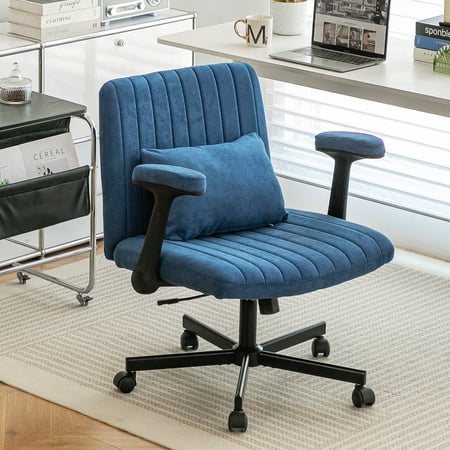
Traditional office chairs with bulky armrests can restrict natural movement, causing shoulder tension and forcing your posture into an unnatural position. An ergonomic office chair without armrest eliminates these limitations, offering a clean, adaptable seating solution. Whether you're a graphic designer needing sweeping arm movements, a writer who shifts positions frequently, or someone who enjoys sitting cross-legged, an armless ergonomic chair provides the flexibility you didn't know you needed.
Ergonomic Insight: Studies show that armrests that don't align with your desk height can elevate the shoulders, leading to trapezius strain. Removing armrests entirely encourages natural shoulder relaxation and can reduce upper back tension by up to 38% when paired with proper desk setup.
Key Benefits of Armless Ergonomic Design
1. Superior Shoulder Mobility
Without armrests, your shoulders can drop naturally, reducing stress on the neck and upper back. This is essential for those who work with their hands at the desk (typing, drawing) or for wide-shouldered individuals.
2. Multi-Position Seating
Easily sit cross-legged, tuck one leg under, or shift weight side to side. Armrests often block these natural postures. An armless chair supports dynamic sitting, which improves core engagement and circulation.
3. Compact & Space-Saving
Perfect for small home offices, tight corners, or shared workstations. The slim profile allows you to push the chair completely under the desk when not in use, maximizing floor space.
4. Universal Fit
Armrests can be a pain point for users with broader frames or those who are petite. Removing them ensures a one-size-fits-all comfort, making it easier for family members or coworkers to share the same chair.
Who Needs an Armless Ergonomic Chair?
While armless chairs offer universal benefits, certain roles and preferences make them an absolute game-changer:
- Musicians & Artists: Guitar players, pianists, and painters require free arm movement without obstruction.
- Gamers: For those who use a wider mouse pad or prefer low-sensitivity settings, armless chairs allow full range of motion.
- Multi-taskers: If you frequently turn to talk with colleagues, reach for files, or use a sit-stand desk, armless chairs make transitions effortless.
- Home Office Flexibility: When your workspace doubles as a yoga or meditation spot, an armless chair is easier to move and store.
📊 The Science of Armless Ergonomics
According to the Occupational Safety and Health Administration (OSHA), a properly designed ergonomic chair should allow the user to maintain neutral posture without forcing any joint into extreme angles. Armrests, if not perfectly adjusted, often cause ulnar deviation or shoulder abduction. By eliminating armrests, you remove a common source of misalignment. Instead, focus shifts to the core ergonomic elements:
- Lumbar support adjustment: Maintains the natural S-curve of the spine.
- Seat depth and tilt: Prevents pressure behind the knees and promotes active sitting.
- Height-adjustable gas lift: Ensures your forearms are parallel to the floor when typing.
Critical Features to Look For
When selecting the ideal ergonomic office chair without armrest, prioritize these components to ensure maximum health benefits and durability:
| Feature | Why It Matters | What to Look For |
|---|---|---|
| Dynamic Lumbar Support | Maintains lower back curve during long sitting sessions | Height-adjustable or self-adjusting lumbar mechanism |
| Seat Depth Adjustment | Ensures thighs are fully supported without pressing on knees | Slider mechanism (2-3 inches of travel) |
| Breathable Mesh vs. Cushion | Temperature regulation and pressure distribution | High-density foam with mesh back or all-mesh design for airflow |
| Sturdy 5-Star Base | Stability and safety during movement | Nylon or aluminum base with dual-wheel casters rated for hard floors or carpet |
| Weight Capacity | Long-term durability and structural integrity | Minimum 275 lbs; heavy-duty options 350+ lbs |
Design Philosophy: Less Is More
An armless ergonomic chair aligns with minimalist design principles — stripping away non-essential elements to focus on pure function. But minimalism does not mean sacrificing support. Premium models incorporate contoured seat pans, waterfall edges to reduce thigh pressure, and tilt tension knobs to customize recline resistance. This creates a chair that feels like a natural extension of your body rather than a rigid throne.
Common Myths About Armless Chairs — Debunked
- Myth: "No armrests means no support." — Reality: Support comes from lumbar, seat, and backrest. Armrests are for occasional relief, not primary support.
- Myth: "They are less professional." — Reality: Modern office aesthetics embrace clean lines. Many executive-level task chairs now offer armless options with high-end finishes.
- Myth: "They cause more fatigue." — Reality: Without armrests, users engage core muscles more actively, preventing slouching and reducing fatigue over long hours.
How to Pair Your Armless Chair with Desk Ergonomics
To maximize the benefits of your ergonomic office chair without armrest, set up your workstation correctly:
- Desk Height: Your elbows should rest at a 90-110 degree angle when typing. Adjust chair height until your forearms are parallel to the floor.
- Monitor Position: Top of the screen at or slightly below eye level. This encourages a neutral neck posture.
- Keyboard & Mouse: Place them close to your body to avoid reaching forward. Without armrests, keep shoulders relaxed and wrists straight.
- Foot Support: Feet flat on the floor or use a footrest to stabilize posture and reduce lower back load.
Pro tip: Since armrests aren't present, consider a desk with a slightly padded edge or use a gel wrist rest for additional comfort during typing breaks.