
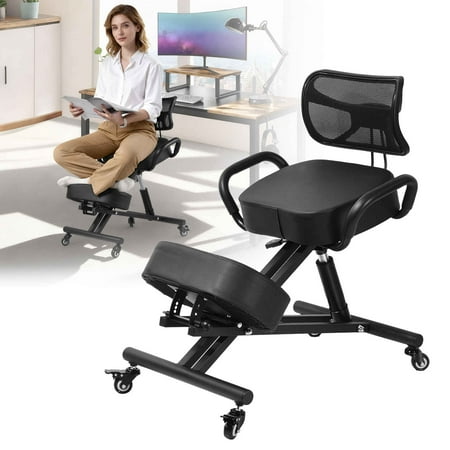

The Critical Link Between Seating, Spinal Health, and Productivity
For millions of professionals, the daily reality of sitting for 8 to 10 hours often translates into nagging back pain, stiff shoulders, and progressive postural decline. Your spine wasn't designed for static sitting, yet modern work demands it. The solution isn't simply sitting less—it's sitting smarter. Premium office chairs for back pain and posture are designed to act as an external support structure, maintaining your spine's natural S-curve while you work.
Medical Insight: Research indicates that 80% of adults experience lower back pain at some point, with prolonged sitting being a primary contributor. However, using a chair with dynamic lumbar support and seat angle adjustment can reduce spinal disc pressure by up to 35%, effectively reversing the negative effects of sedentary work.
Ergonomic Features That Alleviate Discomfort
Understanding the mechanics of back pain is the first step to choosing the right chair. Standard office chairs often force the pelvis into a posterior tilt, flattening the lumbar curve. The following features are non-negotiable when selecting seating for pain relief:
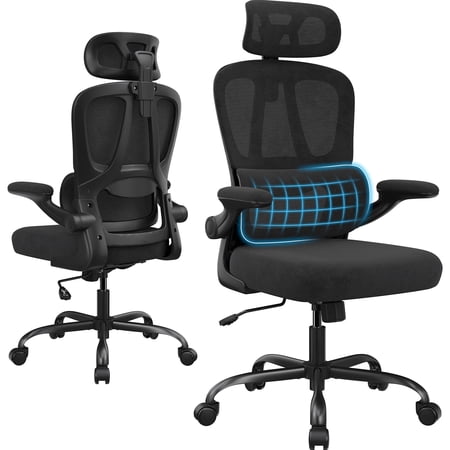
- Independent Lumbar Adjustment: Not just a foam pillow, but a mechanism that moves up/down and in/out to fit your exact lumbar apex.
- Dynamic Tilt Mechanism: Allows the chair to recline with your body weight, maintaining the angle between your thighs and torso even in motion, crucial for disc hydration.
- 3D or 4D Armrests: Height, width, pivot, and depth adjustments allow you to position arms correctly, preventing shoulder hunching and upper back tension.
- Waterfall Seat Edge: A curved front edge that eliminates pressure behind the knees, improving circulation and reducing thigh pain.
- Headrest Integration: Supports the cervical spine, reducing the forward head posture that often accompanies desk work and contributes to chronic neck pain.
Posture Correction: How the Right Chair Retrains Your Body
Think of a high-quality ergonomic chair as a "posture coach." When you sit in a poorly designed chair, your body compensates—you slouch, you lean on one arm, or you jut your chin forward. An ergonomic chair for posture uses resistance and support to gently guide you back to alignment. Over time, this consistent support helps strengthen your core and back muscles, making good posture feel natural rather than forced.
Pelvic Stabilization
Concave seat pans and adjustable depth stabilize the pelvis, preventing it from sliding forward.
Thoracic Extension
Tall, adjustable backrests encourage you to open your chest and roll shoulders back, reversing slouching.
Neutral Spine Alignment
Integrated lumbar and thoracic support maintains the natural 'S' shape, eliminating compensatory bending.
Muscle Memory Development
Consistent support trains your muscle memory to maintain proper alignment even when standing or walking.
Beyond the Chair: The Active Sitting Philosophy
The most advanced office chairs for back pain incorporate "active sitting" technology. This doesn't mean the chair is unstable, but rather that it encourages micro-movements. Chairs with adjustable tilt tension allow you to rock slightly, engaging your core muscles and preventing the stiffness that comes from locked joints. Some premium models feature flexible back frames that mimic the spine's natural movement, distributing pressure evenly across the back. This continuous subtle movement is a game-changer for those suffering from degenerative disc disease or chronic myofascial pain.
Key Metrics to Evaluate Before Buying
| Ergonomic Metric | Impact on Back Pain | What to Look For |
|---|---|---|
| Lumbar Force Curve | Determines how aggressively the chair supports the lower spine | Adjustable depth (10-20mm) and height (150-250mm range) |
| Recline Synchronization | Prevents shirt pull and spinal shear when leaning back | Synchronous tilt where seat pan tilts up as back reclines (ratio 2:1) |
| Seat Foam Density | Affects pressure points on glutes and sacrum | High-resiliency foam (4-6 lb density) with a contoured shape |
| Back Frame Flexibility | Allows the chair to twist with your body, reducing torque on the spine | Flexible polymer or independent dual-back designs |
Material Selection for Pain Management
The material of your chair isn't just about aesthetics—it plays a vital role in therapeutic comfort. For individuals with back pain, materials that reduce pressure and manage temperature are essential.
Premium Breathable Mesh
- Temperature Regulation: Prevents sweating and muscle tension caused by heat.
- Even Weight Distribution: Suspension effect reduces high-pressure points.
- Dynamic Support: Conforms to movement without losing shape.
High-Density Memory Foam
- Pressure Relief: Excellent for those with sciatica or tailbone pain.
- Custom Contouring: Molds to individual anatomy.
- Stability: Provides a solid, non-slip base for the pelvis.
Step-by-Step Guide to Setting Up Your Ergonomic Chair for Posture Relief
Even the best chair is ineffective if set up incorrectly. Follow this systematic process to maximize relief from back pain:
Step 1: Seat Height First
- Action: Adjust height so your feet are flat on the floor.
- Goal: Knees should be at a 90-degree angle or slightly lower than hips to open the hip angle and reduce lumbar stress.
Step 2: Seat Depth Adjustment
- Action: Slide seat pan until there are 2-3 fingers width between the back of your knee and the seat edge.
- Goal: Ensures back support reaches your lumbar region without compressing the hamstrings.
Step 3: Lumbar Positioning
- Action: Adjust lumbar support so it fits snugly into the curve of your lower back (just above the belt line).
- Goal: Maintain the natural inward curve; you should feel support, not pressure.
Step 4: Armrest Alignment
- Action: Raise armrests so shoulders are relaxed, not shrugged.
- Goal: Elbows should rest at 90-110 degrees, reducing upper back and neck tension.