
Understanding the Link Between Your Office Chair and Neck Pain
Neck pain is one of the most common complaints among office workers. According to the World Health Organization, an estimated 1.71 billion people have musculoskeletal conditions worldwide, with neck pain being a leading contributor. If you're reading this, you've probably experienced that dull ache at the base of your skull or the sharp twinge after a long day at your desk. The culprit is often not just your computer screen height, but the office chair for neck pain you're sitting on—or rather, the lack of proper support it provides.
Think of your spine as a chain of building blocks. When you sit in a chair that fails to support the lower back, the rest of the spine—including your neck—compensates, leading to muscle fatigue and pain. A well-designed ergonomic chair acts like a scaffold, holding your body in its natural, neutral alignment. This article will guide you through the essential features of a chair designed to alleviate and prevent neck pain, ensuring your investment leads to healthier, more comfortable workdays.
The Anatomy of Neck Pain: Why Your Chair Matters
Neck pain at work rarely starts in the neck. It often begins with a chain reaction: a poorly adjusted chair causes you to slump your pelvis, which flattens the natural curve of your lower back. To keep your eyes forward, your neck must crane forward—a position often called "forward head posture." For every inch your head moves forward, the weight your neck muscles must support effectively doubles. Since the average human head weighs about 10-12 pounds, a forward shift of just two inches increases the load on your cervical spine to nearly 40 pounds.
Key Ergonomic Features That Target Neck Pain
Selecting the right office chair for neck pain means looking beyond aesthetics. You need a chair that functions as a complete support system. Here are the non-negotiable features:
- Adjustable Headrest (3D or 4D): This is the most critical feature. Look for a headrest that moves up/down, tilts forward/backward, and ideally, slides in/out. This allows you to fit the curve of your neck precisely, supporting you when upright and when reclined. It should contact the base of your skull and upper neck, not push your head forward.
- Independent Lumbar Support: A chair with height-adjustable and depth-adjustable lumbar support helps maintain the natural inward curve of your lower back. A stable pelvis and lower back are the foundation for a relaxed neck.
- Synchronized Recline Mechanism: This feature allows the chair's backrest and seat to move in a coordinated ratio (often 2:1 or 3:1) as you lean back. It keeps you supported and prevents the feeling of being tilted off the chair, which can cause you to tense your neck muscles to stay stable.
- Seat Depth Adjustment: Also known as a sliding seat pan. This ensures there's a 2-3 finger gap between the back of your knee and the seat edge. Proper depth prevents you from slouching to reach the backrest, which directly impacts neck posture.
- 4D Armrests: Adjustable armrests (height, width, depth, and pivot) allow you to keep your elbows close to your body at a 90-degree angle. This relaxes your shoulders, reducing tension that travels up into your neck.
The Posture Pyramid: Building a Pain-Free Workspace
Your chair is the foundation, but it's part of a larger system. Imagine a pyramid:
- Base (The Chair): Provides pelvic and spinal stability.
- Mid-Level (The Desk): Your work surface height should allow your elbows to rest at 90 degrees.
- Apex (The Screen): The top of your monitor should be at or slightly below eye level. If you use a laptop, you absolutely need a separate monitor or a laptop stand to raise the screen. A good chair cannot compensate for a screen that is too low.
According to a study published in the journal *Ergonomics*, workers who used chairs with adjustable headrests and received basic ergonomic training reported a 54% reduction in neck and shoulder discomfort over six months.
Myths About Office Chairs and Neck Pain
Let's debunk some common misconceptions:
- Myth: "A neck pillow is the same as a built-in headrest." Actually, a separate pillow can slide around and push your head forward. An integrated, adjustable headrest is stable and designed to work with the chair's recline mechanism.
- Myth: "Expensive chairs are only for back pain." In reality, high-end ergonomic chairs (often $800+) are engineered for full-spine support, including the cervical region. Their advanced adjustability is what makes them effective for neck pain.
- Myth: "Leaning back is bad for your neck." On the contrary, a dynamic recline with a supportive headrest can reduce spinal disc pressure by up to 30% and relax neck muscles, as long as your head is supported.
Material Considerations for Neck Support Chairs
The material of the chair influences how it supports you over long periods:
Breathable Mesh
- Best for: Those who sit for 8+ hours and want a chair that conforms without heat buildup.
- Neck Support: Mesh back chairs often have separate, adjustable headrests that are well-ventilated.
- Durability: High-quality mesh retains tension well, but cheaper mesh can sag.
Premium Leather/Upholstery
- Best for: Executive settings and those who prefer a cushioned, luxurious feel.
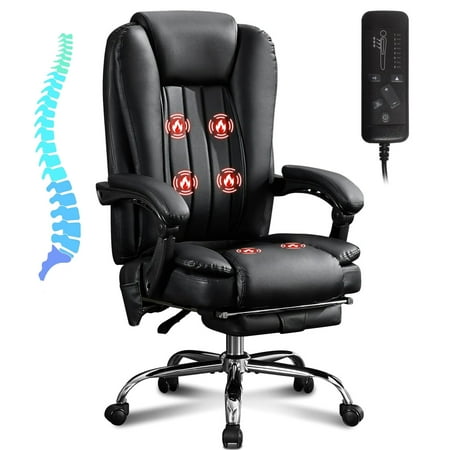
- Neck Support: Often found on high-back executive chairs with plush, padded headrests.
- Consideration: Can be warmer; ensure the foam density is high enough to avoid bottoming out.
Quick Comparison: Chair Types for Neck Pain
| Chair Type | Typical Headrest | Lumbar Support | Best Use Case |
|---|---|---|---|
| Task Chair (Mid-Back) | Usually none or fixed | Basic to Moderate | Short-term use; not ideal for existing neck pain |
| Ergonomic High-Back | Adjustable (3D/4D) | Advanced (height & depth) | Best for preventing and managing neck pain |
| Executive Leather Chair | Often padded but may lack adjustment | Often fixed (but can be good) | Professional image; requires careful selection for adjustability |
| Gaming-Style Chair | Often included, but padding may be stiff | Often includes a lumbar pillow | Good for some, but ergonomic chairs usually offer more precise adjustment |
How to Test an Office Chair for Neck Support
If you have the chance to try a chair before buying, or when you first receive it, follow this simple 5-step test:
- The Headrest Alignment: Sit upright and close your eyes. Relax your head. Then, adjust the headrest so it fills the curve of your neck. You shouldn't have to tilt your head back to touch it.
- The Recline Test: Lean back about 20-30 degrees. Does the headrest stay in contact with your neck, or does it push your head forward? A good chair will maintain contact.
- The Lumbar Check: After setting the headrest, place your hand behind your lower back. You should feel the lumbar support filling the small of your back, not pressing on your spine.
- The Armrest Position: With your arms relaxed at your sides, bend your elbows 90 degrees. The armrests should just lightly contact your elbows, allowing your shoulders to stay down and relaxed.
- The 30-Minute Feel: Sit in the chair for at least half an hour while working. Pay attention to any tension creeping into your shoulders or neck. The right chair should feel like a "non-event"—you shouldn't notice any specific pressure points.
Frequently Asked Questions About Office Chairs and Neck Pain
Conclusion: Invest in Your Cervical Health
Neck pain is not a normal part of office life, and your chair is your first line of defense. Choosing an office chair for neck pain is about more than just comfort—it's a long-term investment in your physical well-being and professional productivity. By prioritizing features like a fully adjustable headrest, independent lumbar support, and a synchronized recline, you create an environment where your body can work without strain.
Remember, the most expensive chair isn't always the best for *you*. The best chair is the one that fits your body dimensions and allows you to maintain a neutral posture effortlessly. Use the guides and features discussed here to make an informed decision. Your neck—and your future self—will thank you.
Final Recommendation: Start by measuring your own height and torso length. Then, focus on chairs that offer the highest degree of headrest and lumbar adjustability within your budget. Don't hesitate to invest a little more for a chair that offers truly customizable neck support; it's cheaper than a lifetime of physiotherapy.