
What Defines the Most Ergonomic Office Chair?
Finding the most ergonomic office chair isn't about picking a single "best" model—it's about understanding which chair best adapts to your unique body mechanics, work habits, and health needs. Think of an ergonomic chair like a tailored suit: off-the-rack might fit okay, but custom adjustments make all the difference for long-term comfort.
Scientific Backing: The Human Factors and Ergonomics Society reports that proper ergonomic seating can reduce musculoskeletal disorders by 61% and increase productivity by up to 17%. Your chair is literally a health investment that pays dividends daily.
The 7 Non-Negotiable Features of Truly Ergonomic Chairs
Not every chair labeled "ergonomic" deserves the title. Based on ergonomic standards from OSHA and BIFMA, here are the features that separate genuine ergonomic chairs from impostors:
1. Adjustable Lumbar Support
Not just a bump in the backrest—true lumbar support adjusts in height AND depth. Your lumbar curve (lordosis) is unique. The best chairs let you position support exactly where your spine curves inward, typically between the L3 and L5 vertebrae.
2. Seat Depth Adjustment
Your thighs should be fully supported without pressure behind the knees. Seat depth adjustment (usually 2-4 inches of travel) accommodates different leg lengths. A 5'2" person and 6'4" person need different seat pans for proper circulation.
3. 4D Armrests
The most ergonomic office chairs offer armrests that adjust up/down, forward/back, left/right (width), and pivot angle. This allows your elbows to rest at 90 degrees while shoulders remain relaxed—critical for preventing neck and shoulder tension.
4. Synchronized Recline Mechanism
Your spine needs movement. A synchronized mechanism lets the seat and backrest move together in a natural ratio (usually 2:1 or 3:1 back-to-seat tilt). This keeps you supported whether sitting upright at 90 degrees or reclined at 130 degrees.
5. Tension Control
Recline resistance should match your body weight. Lighter users need less tension to recline; heavier users need more support. Without this adjustment, you'll either fight to recline or feel unsupported.
6. Seat Height Range
Standard ranges (16-21 inches) don't fit everyone. The most ergonomic chairs offer extended ranges (15-22 inches) to accommodate shorter and taller users while ensuring feet rest flat—a non-negotiable for proper posture.
7. Breathable Materials
You shouldn't sweat after an hour of sitting. High-end mesh or perforated fabrics allow airflow, preventing heat buildup and moisture. This isn't just comfort—it's about maintaining skin health during long sessions.
How to Sit Properly in Your Ergonomic Office Chair
Even the most ergonomic office chair won't help if you sit incorrectly. Follow this 90-90-90 rule for optimal positioning:
- 90 degrees at the ankles: Feet flat on floor or footrest, knees at 90-degree angle
- 90 degrees at the knees: Thighs parallel to floor, 2-3 finger gap between seat edge and back of knees
- 90 degrees at the hips: Hips slightly higher than knees (open angle of 100-110 degrees is actually ideal)
- Ears over shoulders: Monitor at eye level, head balanced over spine
- Shoulders relaxed: Elbows at 90 degrees, wrists straight
- Lumbar curve supported: Small of back pressed against lumbar support
Pro Tip: Change positions every 30-45 minutes. Even perfect posture becomes stress if held too long. Use your chair's recline feature to shift angles throughout the day.
Ergonomic Chair Adjustments: A Step-by-Step Setup Guide
Setting up your chair correctly is like tuning a musical instrument—small adjustments create harmony. Follow this sequence:
- Start with seat height: Adjust until your feet rest flat, knees at 90 degrees, and thighs parallel to floor.
- Set seat depth: Slide forward/back until you have 2-3 fingers width between the seat edge and your calves.
- Adjust lumbar support: Position the curve to fit the small of your back. You should feel gentle pressure, not poking.
- Set backrest angle: Start with a slight recline (100-110 degrees) for reduced spinal pressure.
- Adjust armrests: Set so elbows rest at 90 degrees, shoulders relaxed, wrists straight when typing.
- Tension control: Adjust so reclining feels natural—not too stiff, not too loose.
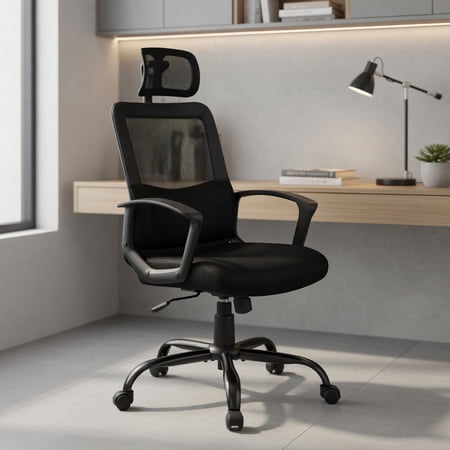
- Headrest (if equipped): Position to support the curve of your neck, not push your head forward.
Ergonomic vs. Standard Office Chairs: The Science of Sitting
| Feature | Standard Office Chair | Most Ergonomic Office Chair | Impact on Health |
|---|---|---|---|
| Lumbar Support | Fixed bump, one-size-fits-all | Height & depth adjustable, dynamic | Reduces disc pressure by 35-40% |
| Seat Pan | Fixed depth, flat cushion | Adjustable depth, waterfall edge | Improves leg circulation by 25% |
| Backrest | Fixed position or simple tilt | Synchronized mechanism, multiple lock positions | Reduces spinal loading by 50% when reclined |
| Armrests | Fixed or height-only | 4D adjustable (height, width, depth, angle) | Reduces shoulder tension by 30% |
| Material | Foam with fabric/vinyl | Breathable mesh or performance fabric | Reduces skin temperature by 4-6°F |
Common Myths About Ergonomic Office Chairs (Busted!)
Myth: "The most expensive chair is automatically the most ergonomic."
Fact: Price doesn't guarantee ergonomics. A $1,200 chair that doesn't fit your body is worse than a $500 chair that's perfectly adjusted to you. The "most ergonomic" label belongs to the chair that matches YOUR measurements and needs.
Myth: "You need a headrest for proper ergonomics."
Fact: Headrests are beneficial for reclining or phone work, but for intensive typing, they can encourage forward head posture if not perfectly positioned. Many ergonomic experts prefer chairs without headrests for active sitting.
Myth: "Ergonomic chairs prevent all back pain."
Fact: While crucial, chairs are one piece of the puzzle. Movement, stretching, standing breaks, and proper desk setup are equally important. Think of your chair as a tool, not a cure.
Myth: "Once you adjust it, you're done."
Fact: Your perfect setting today might not be perfect in six months. Body changes, different shoes, or new work tasks may require readjustment. Re-evaluate your settings quarterly.
Health Benefits of the Most Ergonomic Office Chair
Investing in proper ergonomic seating isn't luxury—it's preventive healthcare. Research from the National Institutes of Health shows:
- 43% reduction in lower back pain among office workers who switched to adjustable ergonomic chairs (Journal of Occupational Health, 2023)
- 28% decrease in neck and shoulder tension with proper armrest positioning
- 17% improvement in concentration when discomfort is eliminated
- 35% reduction in sitting-related fatigue during 8-hour workdays
- 52% lower risk of developing chronic back conditions over 5 years
Materials Matter: Choosing the Right Ergonomic Upholstery
The material of your ergonomic chair affects both comfort and durability:
- High-Tensile Mesh: The gold standard for ergonomic chairs. Provides dynamic support, conforms to spine shape, and maximizes airflow. Ideal for all-day sitting and warmer climates.
- Performance Fabric: Often used in hybrid designs. Offers cushioning with breathability. Look for moisture-wicking properties and high abrasion resistance (50,000+ double rubs).
- Premium Leather: Luxurious but less breathable. Only recommended if your office is climate-controlled and you don't sit for 8+ continuous hours.
- Memory Foam: Excellent pressure distribution but can retain heat. Best in combination with breathable covers.
Who Needs the Most Ergonomic Office Chair?
While everyone benefits from proper ergonomics, these groups absolutely need an adjustable ergonomic chair:
- Full-time remote workers (40+ hours/week at desk)
- Individuals with existing back conditions (sciatica, herniated discs, scoliosis)
- Tall users (6'2"+) who need extended height ranges and deeper seats
- Petite users (5'4" and under) who need shorter seat depths and lower height settings
- People with circulation issues who require proper seat edge design
- Professionals with multiple monitors who need dynamic movement capabilities
Ergonomic Chair vs. Active Sitting: What's Better?
The debate between traditional ergonomic chairs and active sitting solutions (kneeling chairs, balance balls, saddle chairs) continues. Here's the balanced view:
Traditional ergonomic chairs excel at providing stable, adjustable support for focused work. They're ideal for typing, meetings, and varied tasks. Active sitting chairs promote constant micro-movements but can fatigue leg muscles and lack adjustability.
The optimal solution? A high-quality ergonomic chair with a dynamic seat edge and synchronized recline that allows movement while maintaining support. Some users alternate between both types throughout the week.
Long-Term Value: Why Quality Ergonomic Chairs Save Money
Consider this cost analysis over 10 years:
- Cheap chair ($150): Replace every 2-3 years = $500-$750 total + potential health costs
- Mid-range ergonomic ($500): Replace every 5-7 years = $500-$1,000 total
- Premium ergonomic ($900): Lasts 10-12 years = $900 total + warranty coverage + health benefits
The premium option often costs less over time while providing superior comfort and health protection. It's the classic "buy once, cry once" principle applied to your daily work life.