
Why a Good Support Office Chair Is Non-Negotiable for Your Health
For millions of professionals, the office chair is the command center of productivity. Yet, most standard chairs fail to provide the essential spinal alignment needed to prevent fatigue and chronic pain. A good support office chair is not merely a seat—it’s a proactive health investment that safeguards your spine, enhances focus, and elevates your work experience. With sedentary jobs averaging over 8 hours per day, choosing the right chair can be the difference between thriving and merely surviving.
Ergonomic Reality: Research from leading occupational health studies indicates that workers using properly supportive seating report 42% less lower back discomfort and experience a 34% increase in task accuracy during afternoon hours. The science is clear: targeted support drives performance.
Core Elements of True Supportive Design
Not all chairs labeled "ergonomic" deliver real support. The following components define a genuinely supportive office chair:
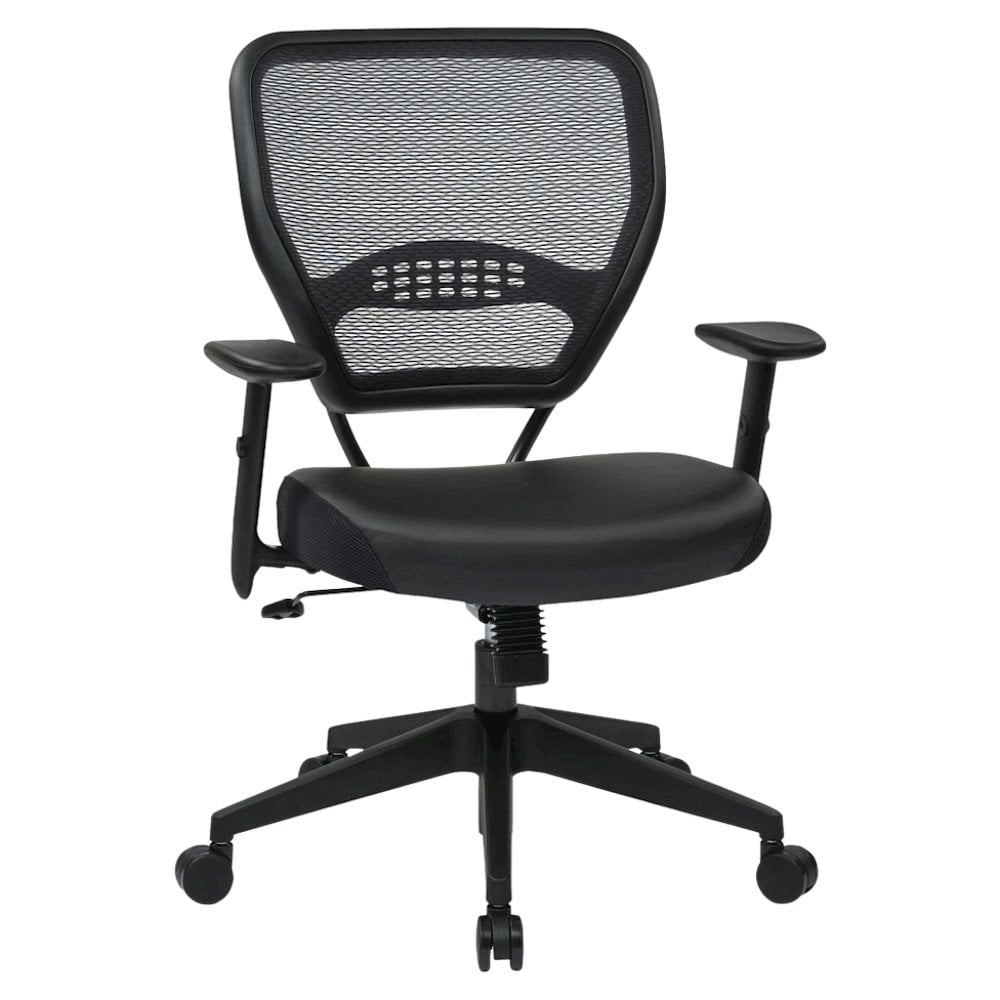
- Dynamic Lumbar Mechanism: Adjustable not just in height but also in depth (active curve) that moves with you, maintaining constant lower back contact.
- Contoured Backrest: A backrest that mirrors the natural S-shape of the spine, offering thoracic and sacral support.
- High-Density Seat Foam: Prevents bottoming out, distributes weight evenly, and supports hips without creating pressure points.
- Independent Tilt Tension: Allows the chair to recline with your body while maintaining neck and back alignment during breaks or deep focus sessions.
- Responsive Armrests: 3D or 4D adjustable armrests reduce shoulder strain and encourage relaxed, open posture.
Choosing the Right Support Level: A Structured Approach
Selecting your ideal chair involves matching your body type and work habits to specific support features. Use this decision matrix:
| User Profile | Primary Support Need | Recommended Feature Focus | Chair Type Example |
|---|---|---|---|
| Chronic Lower Back Pain | Active lumbar & pelvic support | Height/depth adjustable lumbar + seat angle tilt | Ergonomic mesh with built-in lumbar curve |
| Tall User (6'2"+) | Extended backrest height, head support | High back (22"+), adjustable headrest, seat depth 20"+ | Big & tall executive support chair |
| All-Day Desk Worker (8+ hrs) | Balanced dynamic support & breathability | Synchro-tilt mechanism, breathable mesh, multi-density foam | Premium ergonomic task chair |
| Executive / Client-Facing | Luxury materials + structural support | Leather with memory foam, polished metal base, adjustable lumbar | Leather high-back executive with lumbar |
The Science of Support: How Spinal Alignment Boosts Energy
When your chair provides consistent lumbar and thoracic support, your spine remains in a neutral position, reducing unnecessary muscle tension. This allows oxygen flow and neural communication to operate efficiently, preventing the 3 PM energy crash. A good support office chair essentially acts as a postural coach, training your body to maintain ergonomic habits even during intense work sessions.
Reduces Muscle Fatigue
Supports natural curves, decreasing load on back muscles by up to 35%.
Enhances Circulation
Waterfall seat edge and proper seat depth promote blood flow to legs.
Increases Focus Duration
Less discomfort means longer uninterrupted deep work sessions.
Long-term Spine Health
Prevents disc compression and degenerative conditions over years of use.
Material & Build Quality for Sustainable Support
The durability of support features depends heavily on material quality. Chairs constructed with reinforced steel frames, high-resilience foam, and premium mesh maintain their supportive properties for over a decade, whereas cheaper chairs often lose integrity within 2 years. Below is a material breakdown:
High-Density Foam
Retains shape under constant pressure; ideal for seat pans and lumbar cushions. Provides firm but forgiving support.
Breathable Mesh
Self-adjusting tension, conforms to back movement, excellent for hot climates, and offers consistent spinal contact.
Top-Grain Leather
Molds to the user over time, offers luxurious support with proper internal padding. Excellent for executive environments.
Reinforced Nylon Base
Provides stability and higher weight capacity, ensuring that support features remain aligned and durable for heavy use.
Common Support Pitfalls to Avoid
Even well-intentioned buyers often overlook critical aspects that compromise support. Ensure you avoid these common mistakes:
- Fixed Lumbar Bump: A non-adjustable lumbar protrusion may hit the wrong spinal level, causing discomfort.
- Shallow Seat Depth: If the seat is too short, thighs lack support; if too long, it cuts off circulation. Adjustability is key.
- Rigid Backrest: A backrest that doesn't move with you forces static posture, leading to stiffness.
- Low Weight Capacity: Chairs rated under 250 lbs often have weaker mechanisms that degrade support quickly.
Ultimate Guide: How to Optimize Your Good Support Office Chair Setup
Even the best chair won't deliver full benefits if not adjusted correctly. Follow this 5‑step process to maximize support and comfort.
Step 1: Set Seat Height
Your feet should rest flat on the floor, with thighs parallel to the ground. Elbows should form a 90-degree angle with the desk surface. This foundation ensures lower body support and prevents slouching.
Step 2: Adjust Lumbar Support
Position the lumbar pad or curve so it fills the gap in your lower back. The most supportive chairs allow both vertical and depth adjustments. You should feel gentle, even pressure across the lumbar region.
Step 3: Set Seat Depth
Leave 2–3 finger widths between the back of your knees and the seat edge. This prevents pressure on the popliteal arteries while keeping hips fully supported.
Step 4: Configure Armrests
Adjust armrests so your shoulders remain relaxed and wrists stay straight while typing. Armrests should support without elevating your shoulders.
Step 5: Use Recline Tension & Lock
Set tilt tension so you can recline smoothly without sudden drops. A dynamic recline encourages micro-movements that nourish spinal discs throughout the day.
Pro Insight: Regularly reassess your adjustments every 3–4 months or after any change in workspace. Body posture can shift, and fine-tuning your chair ensures continuous support alignment.
Frequently Asked Questions About Good Support Office Chairs
Conclusion & Final Recommendations for Superior Support
Choosing a good support office chair is a decisive step toward protecting your physical well-being and maximizing professional output. By investing in a chair with advanced ergonomic features—dynamic lumbar, adjustable seat depth, and robust build—you are equipping yourself for sustainable success. Whether you work from home or lead a corporate team, your chair should be an active partner in health.
Selection Summary by Priority
Select chairs with independent lumbar depth + height adjustment, preferably with memory foam or active curve technology. These models excel in eliminating lower back fatigue.
High-quality mesh chairs with integrated lumbar systems offer cool comfort without compromising on support, ideal for warm environments and high-intensity tasks.
Leather high-back executive chairs with adjustable lumbar and multi-density foam deliver both aesthetic authority and orthopedic-grade support.
Remember: the best support chair is one that aligns with your unique body dimensions and usage patterns. Test adjustability features, prioritize build quality, and enjoy the lasting benefits of pain‑free, productive workdays.