

Beyond the Basic Recline: Understanding Seat Tilt
Imagine your office chair as more than just a static throne. Think of it as a dynamic partner in your workday, one that intuitively responds to your every shift in posture and task. That is the promise of a high-quality office chair with seat tilt adjustment. Unlike basic chairs that force you into a single, fixed position, these chairs introduce a crucial element of movement. This isn't just about leaning back for a quick break; it's about engaging your body's natural mechanics to stay comfortable, alert, and pain-free for the long haul.
For years, the standard office chair offered a simple pivot point, often leading to awkward postures and pressure on the backs of the thighs. Modern ergonomics has evolved. Today, an office chair with seat tilt adjustment offers a sophisticated range of motion—from a gentle forward tilt that helps you focus on detailed tasks to a synchronized recline that keeps your feet planted while supporting your entire back. In this guide, we'll dissect the different types of tilt mechanisms, explore their unique benefits, and help you understand exactly what to look for to transform your sitting experience.
The Mechanics of Movement: Decoding Tilt Systems
Choosing the right chair starts with understanding the 'how' and 'why' behind its movement. The tilt mechanism is the engineering heart of your chair, and it dictates how the chair responds to your body. Let's break down the most common types you'll encounter.
1. Center Tilt (or Swivel Tilt): The Traditional Approach
This is the most basic mechanism, commonly found in entry-level chairs. The pivot point is located roughly in the center of the seat, under your chair. As you lean back, the front of the seat rises. While simple, this can create pressure points under your thighs and may cause your feet to lift off the floor, reducing stability. For an office chair with seat tilt adjustment, this is the least dynamic option but can still offer basic relief for short-term use.
2. Knee-Tilt Mechanism: The Ergonomic Leap Forward
An innovation in ergonomic seating, the knee-tilt mechanism shifts the pivot point forward, typically near your knees. When you recline in a chair with a knee-tilt, your feet naturally stay more planted on the floor. The front of the seat rises only slightly, significantly reducing thigh pressure and promoting better circulation. This design allows for a more relaxed and stable recline, making it a favorite for managers and executives who spend hours in deep-focus work or meetings.
- Primary Benefit: Maintains better blood flow to legs and feet.
- Best For: Users who recline frequently and want a stable, pressure-free experience.
- Key Feature: Often paired with adjustable tilt tension to match your body weight.
3. Synchro-Tilt Mechanism: The Gold Standard for Task Work
If knee-tilt is for relaxed recline, synchro-tilt is for active, task-oriented work. This sophisticated mechanism links the movement of the backrest and the seat in a synchronized, predetermined ratio (commonly 2:1 or 3:1). This means for every two or three degrees the backrest reclines, the seat tilts up by one degree. This ingenious design keeps you in an optimal, ergonomically-sound posture throughout the entire recline range. Your back is supported, and your hips remain open, preventing the "slouching" feeling common in other chairs. A high-quality office chair with seat tilt adjustment almost always features a synchro-tilt mechanism.
💡 Industry Insight: A study in the journal 'Applied Ergonomics' found that chairs with synchronized mechanisms significantly reduced spinal disc pressure and encouraged more frequent, subtle posture changes compared to fixed chairs. This micro-movement is key to preventing fatigue.
4. Forward Tilt: Your Secret Weapon for Focus
Often overlooked, the forward tilt function is a game-changer for specific tasks. This feature allows you to lock the seat in a slight forward angle. Why would you want this? Imagine leaning over your desk to write notes, sketch ideas, or read a document spread out before you. A forward tilt opens your hip angle, aligns your spine, and brings you closer to your work without hunching. It's like having a drafting stool, built into your office chair with seat tilt adjustment. This feature is invaluable for designers, writers, or anyone who performs concentrated desk work.
5. Multi-Function vs. Synchronized: What's the Difference?
You'll often see these terms. A multi-function mechanism usually allows you to adjust the backrest and seat angles independently. While this offers flexibility, it can be tricky to find the perfect balance. A synchronized mechanism, as described above, automates this relationship for you, ensuring optimal ergonomic alignment every time you move. For most users, a synchronized mechanism is the superior choice for an office chair with seat tilt adjustment.
Why Your Next Chair Needs Tilt Adjustment: A Health & Productivity Deep Dive
Investing in a chair with advanced tilt features isn't a luxury; it's a long-term investment in your physical well-being and professional output. The benefits extend far beyond simple comfort.
The Posture Payoff
Static sitting is the enemy of a healthy spine. It leads to muscle fatigue, slouching, and increased pressure on intervertebral discs. A dynamic office chair with seat tilt adjustment encourages movement. As you shift between tasks—from typing an email to taking a phone call—your chair moves with you. This constant, subtle shift in posture engages core muscles and prevents the stiffness that sets in after hours in a fixed position. It's like giving your back a gentle, continuous workout.
Circulation and Energy
Have you ever felt your legs "fall asleep" or noticed swelling in your feet after a long day? That's poor circulation caused by pressure on the underside of your thighs. A chair with proper tilt, especially a knee-tilt or synchro-tilt design, distributes your weight more evenly and reduces this pressure point. Better circulation means more oxygen to your brain and muscles, directly translating to higher energy levels and sharper mental clarity throughout the afternoon.
Adaptability for Every Task
No single posture is perfect for every work activity.
- Intense typing/data entry: An upright posture with a neutral seat angle keeps your wrists straight and your eyes on the screen.
- Reading or brainstorming: A slightly reclined position with the seat tilted back can relax your spine and encourage creative thinking.
- Writing or detailed work: Engaging the forward tilt brings you closer to the desk and prevents the rounded-shoulder posture that leads to neck and upper back pain.
An office chair with seat tilt adjustment seamlessly transitions between these modes, providing the right support at the right time.
Quick Comparison: Tilt Mechanism Pros & Cons
✅ Pros of Advanced Tilt
- Reduced Lower Back Pain: Promotes spinal alignment and reduces disc pressure.
- Improved Circulation: Minimizes pressure on thighs for better blood flow.
- Enhanced Focus: Dynamic comfort reduces fidgeting and distractions.
- Versatility: Adapts to different tasks and postures throughout the day.
- Long-Term Durability: High-quality mechanisms are built to last for years.
❌ Potential Drawbacks
- Higher Cost: Advanced mechanisms are found in mid-range to premium chairs.
- Learning Curve: It may take a few days to find your preferred settings.
- Complexity: More moving parts could theoretically require maintenance (though rare in quality chairs).
- Overwhelming Choices: The variety of mechanisms (synchro, knee-tilt, etc.) can confuse buyers.
Key Features to Look for Beyond the Tilt
While the tilt mechanism is the star, a truly great office chair with seat tilt adjustment offers complementary features that complete the ergonomic package.
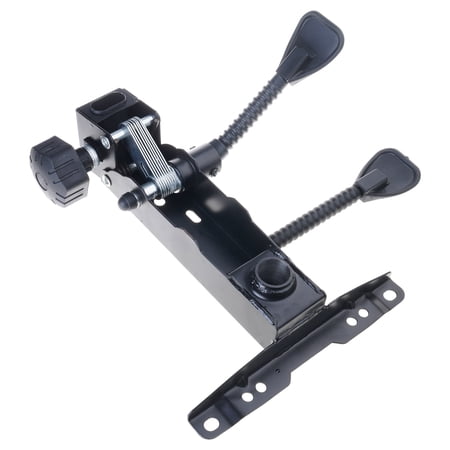
- Tilt Tension Adjustment: This knob or dial controls how much force is required to recline. It must be adjustable to your body weight. A tension that's too loose will make you feel unsupported; too tight, and you'll fight the chair's motion.
- Tilt Lock (or Multi-Position Lock): This allows you to lock the chair at your desired recline angle. Look for chairs that let you lock in multiple positions, not just upright and fully reclined. This gives you precise control.
- Adjustable Lumbar Support: Tilt works best when your lower back is properly supported. Ensure the chair has a lumbar support that can be adjusted for height and depth.
- Seat Depth Adjustment: The seat pan should slide forward or backward so you can maintain a 2-3 finger gap between the back of your knee and the seat edge, ensuring proper circulation.
- 4D Armrests: Armrests that adjust in height, width, depth, and angle allow you to keep your shoulders relaxed and elbows at a 90-degree angle, no matter your tilt position.
Frequently Asked Questions About Seat Tilt Adjustment
Conclusion: Invest in Movement, Invest in Yourself
Your office chair is the foundation of your workspace. Choosing a model with a sophisticated office chair with seat tilt adjustment is one of the most impactful decisions you can make for your health, comfort, and productivity. It's an acknowledgment that the human body is designed to move, and your chair should facilitate that, not fight it. From the stable support of a knee-tilt to the task-optimized synchro-tilt and the focused-forward lean, these mechanisms empower you to create a workspace that adapts to you.
As you browse the top picks below, remember to look beyond the aesthetics. Pay close attention to the type of tilt mechanism, the adjustability options, and the overall build quality. Test the tilt tension, explore the lock positions, and imagine how the chair will support you through your entire workday. By investing in a chair that moves with you, you're not just buying a piece of furniture; you're investing in years of better posture, higher energy, and pain-free productivity.