
Beyond Just a Seat: Why Your "Chair for Office Use" Defines Your Workday
Imagine spending eight hours in a car with a seat that doesn't adjust, offers no back support, and is upholstered in non-breathable plastic. You'd arrive home exhausted and sore. That’s exactly what happens when you choose the wrong chair for office use. For millions of professionals, the office chair is the most-used piece of furniture, yet it's often the most overlooked. A well-chosen chair isn't a luxury; it’s a productivity tool and a health investment. It quietly supports your spine, encourages good posture, and lets you focus on your work, not your aching back. This guide dives deep into what makes a chair truly suitable for sustained office work, helping you cut through the marketing noise.
Anatomy of a Great "Chair for Office Use": 5 Critical Factors
Selecting a chair isn't just about picking one that looks good. It's about understanding how its parts work together to support a dynamic, seated body. Here are the core components you need to evaluate.
1. The Seat: Your Foundation for Comfort
The seat pan is where you spend all your time, so its shape and padding are paramount. Look for a "waterfall edge" — a gentle downward curve at the front of the seat. This prevents pressure on the back of your thighs, maintaining healthy blood circulation to your legs. The foam density matters more than thickness. High-density foam retains its shape and support for years, while soft foam can "bottom out" within months, leading to discomfort and contact with the hard base beneath.
- Seat Depth Adjustment: A must-have feature. You should be able to slide the seat forward or backward so there's a 2-3 finger gap between the back of your knee and the seat edge. This ensures proper thigh support for different leg lengths.
- Material Breathability: If you run warm, fabric or mesh seats are better than solid leather or bonded leather, which can trap heat and moisture.
2. Backrest: The Spine's Ally
The backrest of a good chair for office use should do more than just hold you up. It should actively promote the natural S-curve of your spine. Look for these features:
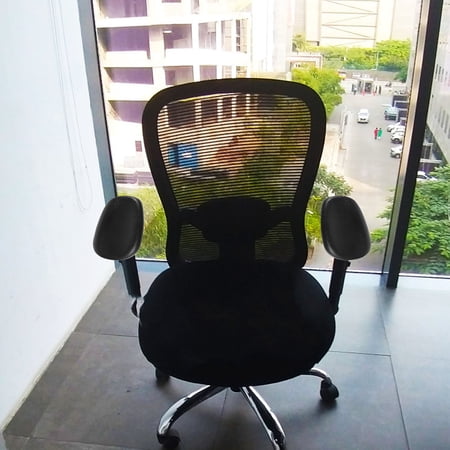
- Adjustable Lumbar Support: This is non-negotiable. Static lumbar bumps often hit the wrong spot. You need support that moves up and down (and ideally in/out) to fit the curve of your lower back.
- Backrest Height: For all-day office use, a mid-back chair is often sufficient, but many prefer a high-back chair that supports the entire back and sometimes includes a headrest for leaning back during breaks.
- Recline Mechanism with Tension Control: The ability to lean back and relax changes pressure on your spine. A good recline mechanism (like a synchro-tilt) lets your backrest and seat move in a balanced way, and you should be able to adjust the tension to match your body weight.
3. Armrests: The Overlooked Ergonomic Hero
Many people remove armrests or ignore them, but properly adjusted armrests reduce strain on your shoulders and neck. They should allow your arms to rest comfortably with your shoulders relaxed.
- 4D Adjustability: This means armrests that move up/down, forward/back, left/right (pivot), and sometimes width-adjustable. This lets you position them perfectly to support your elbows at a 90-degree angle while typing.
- Material: Look for soft, non-abrasive padding. Hard plastic armrests can cause elbow discomfort over time.
4. Base and Casters: Stability and Mobility
A five-point base is the industry standard for stability. But the material matters: nylon bases are strong and affordable; aluminum bases are lighter and more premium. Casters (wheels) must match your floor type. Hard casters are for carpets; soft, rubberized casters are for hard floors (wood, tile) to prevent scratching and provide smoother rolling. Some chairs now offer "braking" casters that lock when you stand up.
5. Tilt Mechanisms: More Than Just Leaning Back
Standard tilt locks you in one position. For dynamic sitting, consider chairs with:
- Knee-tilt or Center-tilt: These mechanisms allow the chair to tilt from a point near your knees or center, keeping your feet more planted on the floor and reducing pressure on the back of your thighs compared to a standard tilt.
- Forward Tilt: A feature often overlooked but great for intense desk work or writing. It tilts the seat forward slightly, helping you sit upright and engage your core.
Quick Stat: The Human Factors and Ergonomics Society notes that using a chair with even basic adjustability (height, backrest angle) can reduce reported discomfort by over 50% compared to a fixed, non-adjustable chair. This highlights why investing in a proper chair for office use is a direct investment in employee well-being.
Matching Chair Types to Your Work Style
Not all office work is the same. Your specific tasks should influence your choice.
Material Matters: Longevity and Care for Office Chairs
The material of your chair for office use dictates not only its look but also its lifespan and maintenance.
- Premium Fabric: Offers warmth, breathability, and a vast range of colors. Look for fabric with a high "double rub" count (30,000+ for heavy-duty use). It's comfortable but can stain if not treated.
- Mesh: Champion of breathability. High-quality mesh (like Pellicle) conforms to your back without pressure points. Be wary of cheap mesh that stretches out and loses support.
- Leather (Genuine/Top-Grain): Durable, easy to wipe clean, and develops a patina. It conveys a professional image but can be warm and requires conditioning to prevent drying/cracking.
- Bonded Leather/Faux Leather: A budget-friendly option. It looks like leather initially but is prone to peeling and flaking after a couple of years of daily use. For daily office use, it's often better to choose a high-quality fabric over bonded leather.
Frequently Asked Questions About Chairs for Office Use
Conclusion: Your Next Chair is an Investment in Your Best Work
Finding the ideal chair for office use doesn't have to be overwhelming. By focusing on adjustability—seat depth, lumbar support, armrests—and matching the material to your environment, you can transform your workspace. Remember, the best chair is the one that fits you, your body, and your specific work habits. It's the foundation upon which productive, comfortable, and healthy workdays are built. Use the product grid above to explore top-rated options that fit the criteria we've discussed, and take the next step toward a better workday.