
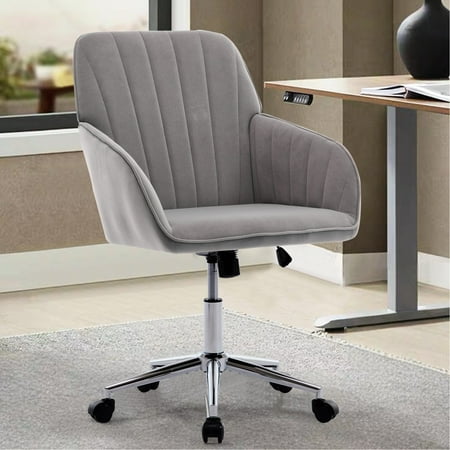
Your Ultimate Guide to Office Chair Spine Support
Think of your spine as the central pillar of a bridge—when it's properly supported, everything runs smoothly. For millions of people who spend 8+ hours at a desk, an office chair that lacks proper spine support is like a bridge with a weak foundation. Back pain is the number one complaint among office workers, and it's often directly linked to inadequate seating. But choosing a chair with excellent spine support isn't just about avoiding pain; it's about investing in your long-term health and daily productivity. This guide will walk you through everything you need to know about finding the perfect office chair that cradles your spine and promotes a pain-free workday.
Did you know? The human spine is not straight—it has a natural S-curve. A quality office chair with spine support is designed to maintain this curve, reducing pressure on intervertebral discs. Research from the National Institutes of Health indicates that proper lumbar support can reduce disc pressure by up to 40%, significantly lowering the risk of chronic back conditions.
1. The Anatomy of Spine Support: Beyond Just Lumbar
When we talk about office chair spine support, most people immediately think of a cushion in the lower back. While lumbar support is crucial, true spinal support is a holistic system involving several chair components working in harmony:
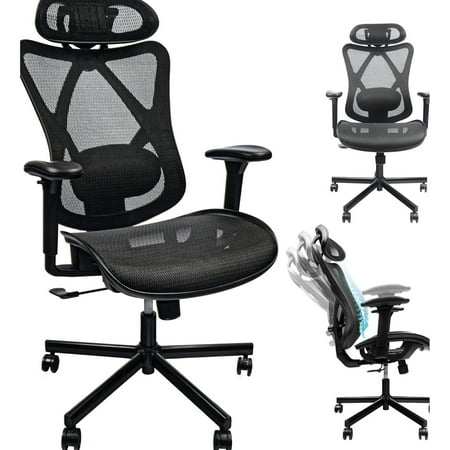
- Lumbar Adjustment (Height & Depth): This is the cornerstone. The best chairs allow you to move the lumbar support up/down to align with your belt line and also in/out to increase or decrease the curve's depth. This personalized fit prevents slouching.
- Backrest Shape and Height: A high backrest that follows the natural curvature of your entire spine (thoracic and lumbar) provides continuous support. Look for chairs with a pronounced S-shape profile.
- Seat Depth and Waterfall Edge: When you sit, your knees should be at a 90-degree angle with a few inches between the back of your knees and the seat. A waterfall front edge reduces pressure on the sciatic nerve and promotes healthy circulation.
- Tension Control and Synchro-Tilt: A mechanism that allows the backrest to move independently of the seat (synchro-tilt) encourages dynamic sitting. As you lean back, your feet stay planted, and your spine maintains a natural angle.
2. How to Test Spine Support Before You Buy (Even Online)
You can't always sit in a chair before buying, especially online. Here's a practical checklist you can use to evaluate a chair's specifications and return policy to ensure it will support your spine:
- Check for 'Adjustable Lumbar': Don't settle for a fixed bump. Ensure the description explicitly says "height-adjustable lumbar" and ideally "depth-adjustable."
- Look at the Backrest Dimensions: If you're tall, look for a backrest height of at least 22 inches. For most people, ensure the backrest reaches your shoulder blades.
- Read Reviews for 'Back Pain': Search user reviews (on sites like Amazon or Walmart) for phrases like "back pain," "lumbar," or "support." Real-world feedback from people with similar issues is invaluable.
- Understand the Return Policy: A 30-day or longer return policy allows you to test the chair at home. Sit in it for several hours over a week. If your back feels worse, send it back.
3. Spine Support by Body Type: One Size Doesn't Fit All
A chair that supports a 5'2" person perfectly may be a nightmare for someone 6'2". Your unique body dimensions dictate the type of spine support you need:
| Body Type | Key Spine Support Needs | What to Look For |
|---|---|---|
| Petite (under 5'4") | Prevent lower back strain from seat too deep | Adjustable seat depth (shorter depth), lumbar that sits lower, higher chair base to reach floor properly. |
| Average (5'5" - 5'11") | Maintain natural S-curve throughout day | Highly adjustable lumbar, medium backrest height, good tilt tension. |
| Tall (over 6') | Support upper back and shoulders, prevent hunching | Extra-high backrest (24"+), adjustable headrest, lumbar that moves high enough. |
| Plus-Size (over 250 lbs) | Sturdy frame that won't sag, wide seat to prevent pressure points | Reinforced frame, wider seat pan, high-density foam, robust tilt mechanism rated for higher weight. |
4. Material Matters: Which One Helps Your Spine?
The material covering the chair plays a subtle but important role in spine support. It affects how long you can sit comfortably and how well the support system works.
- Breathable Mesh: Ideal for spine support because it conforms to your back's shape without creating hot spots. It provides consistent tension across the entire back, which helps maintain posture. Great for those who sit for long, intense periods.
- Premium Leather: Offers a firm, stable support surface. High-quality leather with adequate padding can be excellent, but cheaper leather can crack and lose shape, reducing support over time. It requires maintenance to stay supple.
- High-Density Foam (Fabric): Provides a "hugging" sensation. Look for foam that is firm enough not to sag. If foam compresses too easily, you'll sink and lose proper spinal alignment.
5. Three Common Mistakes That Sabotage Spine Support
Even with the best chair, you can undermine its spine-supporting features. Avoid these pitfalls:
- Ignoring Armrest Adjustment: If your armrests are too high, you'll shrug your shoulders, straining your upper spine. Too low, and you'll slouch. Set them so your arms rest comfortably with shoulders relaxed.
- Sitting Too Far from the Backrest: If there's a gap between your lower back and the chair's lumbar support, you get zero benefit. Scoot your hips all the way back.
- Using a Thick, Aftermarket Cushion: While sometimes helpful, a thick cushion can alter your seat height and depth, negating the chair's built-in ergonomics. If you need extra cushioning, look for a thin, ergonomically shaped one.
Ergonomics in Action: A study published in the journal Spine found that using an ergonomic chair with proper lumbar support reduced perceived lower back discomfort by 53% among office workers over a 6-month period compared to using standard task chairs.
Frequently Asked Questions About Office Chair Spine Support
Conclusion: Invest in Your Spine, Invest in Your Future
Choosing an office chair with proper spine support is one of the most important health decisions you can make for your professional life. It's not just a piece of office furniture; it's a tool that directly impacts your physical well-being, focus, and energy levels. By understanding the key features—adjustable lumbar, seat depth, backrest height, and dynamic mechanisms—and matching them to your unique body, you can transform your workday from a source of pain into a period of comfort and productivity. Remember, the best chair is the one that fits you and encourages you to move. Take your time, use our guide, and give your spine the support it deserves.