
Why Lower Lumbar Support Is Non-Negotiable for Office Workers
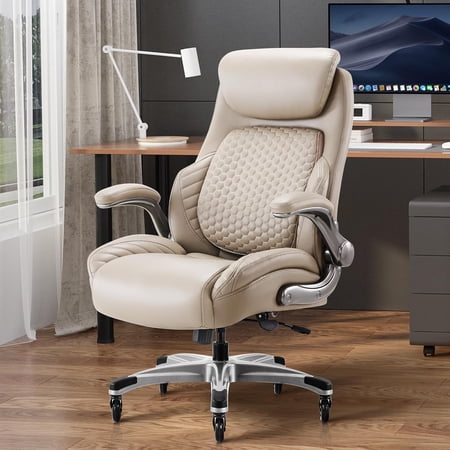
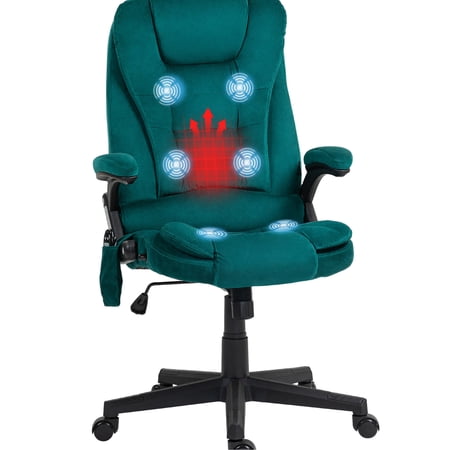
Imagine your spine as the central pillar of a skyscraper. When that pillar is properly aligned, the entire structure remains stable and functional. But with every hour spent leaning forward into a screen, that pillar begins to tilt, creating stress fractures in the form of muscle knots, chronic pain, and long-term disc issues. This is precisely why a lower lumbar support office chair isn't just a luxury—it's a necessity for anyone who spends more than six hours a day at a desk.
Ergonomic Insight: Research from the Occupational Safety and Health Administration indicates that implementing proper lumbar support reduces workplace back injury claims by nearly 35%. The lower back (lumbar region) supports the majority of your upper body weight. Without targeted support, your muscles overcompensate, leading to fatigue, tension headaches, and sciatica.
The Anatomy of Effective Lumbar Support
Not all lumbar features are created equal. A true lower lumbar support office chair incorporates several engineering principles:
- Curvature Matching: The backrest mimics the natural lordotic curve of the spine. Without this, the chair forces you into a 'C' shape, which accelerates spinal fatigue.
- Adjustable Depth (Protrusion): The best chairs allow you to push the lumbar mechanism forward or pull it back, accommodating different body shapes and preferences.
- Height Adjustability: Since people have different torso lengths, the lumbar pad must move vertically to sit exactly at the small of the back (usually between the 2nd and 4th lumbar vertebrae).
- Dynamic Response: Premium models feature 'active' lumbar that moves slightly with your micro-movements, offering constant contact without feeling rigid.
Beyond Pain Relief: How Lumbar Support Boosts Productivity
Critical Features to Look For: Lower Lumbar Edition
When shopping for a chair with superior lower back support, keep this checklist handy. These specifications separate average seating from therapeutic-grade chairs.
| Feature Category | Why It Matters for Lumbar Support | What to Look For |
|---|---|---|
| Lumbar Mechanism Type | Static supports can miss your curve; dynamic supports adapt. | Mechanical knob for depth, lever for height adjustment, or air-bladder system. |
| Backrest Height & Contour | A backrest that's too short won't support the full lumbar region. | High-back or mid-back chairs with a pronounced inward curve at the base. |
| Seat Depth Adjustment | Proper seat depth ensures your back is flush against the lumbar support. | At least 2 inches of sliding seat pan adjustment. |
| Tilt Tension with Lock | Reclining slightly shifts pressure away from the lower back discs. | Multi-angle lock and adjustable tension knob to match your weight. |
| Material Flexibility | Mesh provides breathable give; high-density foam offers firm cradling. | High-tensile mesh or memory foam that doesn't compress too flat. |
Who Benefits Most from Lumbar-Focused Chairs?
While virtually every desk worker benefits, certain groups see dramatic improvements with a dedicated lower lumbar support office chair:
- Remote Professionals: Home setups often lack proper ergonomics. A lumbar chair compensates for non-adjustable desks.
- Individuals with Sciatica or Herniated Discs: Targeted support reduces nerve compression and shooting pain.
- Drivers / Multi-taskers: Those who swivel and lean frequently need dynamic lumbar that stays aligned.
- Post-pregnancy and Recovering Athletes: Core strength may be compromised; lumbar support acts as a temporary stabilizer.
Step-by-Step Guide: Setting Up Your Lumbar Support Chair
Step 1: Adjust Seat Height
Your feet should rest flat on the floor with thighs parallel to the ground. This anchors your pelvis, allowing the lumbar support to work correctly.
Step 2: Engage Lumbar Pad
Raise or lower the lumbar mechanism until it fits snugly into the curve of your lower back. If available, increase depth until you feel gentle, even pressure.
Step 3: Adjust Seat Depth
Slide the seat pan forward or backward so there are about 2-3 fingers of space between the back of your knee and the seat edge. This ensures your back is fully contacting the lumbar support.
Step 4: Set Recline Tension
Adjust tilt tension so you can recline with minimal effort but not fall backward. A slight recline (100-110 degrees) is ideal for distributing weight away from lumbar discs.
Step 5: Armrest Alignment
Position armrests so shoulders remain relaxed. This prevents upper body tension that can indirectly cause lower back strain.
Common Myths About Lumbar Support Debunked
Let's clear up some misconceptions that might prevent you from investing in proper spinal health:
- Myth: "A lumbar pillow is just as good as built-in support."
Fact: While pillows help, they can shift during movement. Built-in adjustable mechanisms stay locked in place and offer consistent ergonomics. - Myth: "Only tall people need lumbar adjustment."
Fact: Lumbar curvature exists in all heights. Short torsos require height adjustment just as much as tall ones to target the correct vertebrae. - Myth: "Firm is always better for support."
Fact: Support should be firm enough to maintain alignment but forgiving enough to not create pressure points. Overly firm lumbar can cause bruising or restrict circulation.