
Your Spine on a Chair: The Hidden Cost of Sitting
Imagine your spine as a bridge. When you stand, the cables (muscles and ligaments) are perfectly tensioned to hold the road (your torso) level. The moment you slump into a poorly designed chair, it's like loosening half the cables—the bridge starts to sag, putting stress on the structure. This is exactly what happens to your intervertebral discs when you sit without proper spinal support. A spine office chair acts as the precision tool that keeps that bridge perfectly aligned, even during a nine-hour workday. Unlike generic seating, these chairs are biomechanically designed to cradle your vertebrae, from the lumbar curve to the thoracic arch.
The average office worker spends over 70,000 hours sitting in their lifetime. Investing in a chair that actively supports your spinal health isn't a luxury; it's a long-term investment in your mobility and freedom from chronic pain. This guide dives deep into what makes a chair truly "spine-friendly," the technology behind it, and how to choose the perfect model for your unique back.
The Anatomy of a True Spine Office Chair: Beyond Basic Lumbar Support
Many chairs claim to offer back support, but a genuine spine office chair incorporates several distinct engineering principles. It's not just about a bump in the lower back; it's about a holistic system that adapts to your spine's natural S-shape.
1. The Three-Zone Backrest Philosophy
Premium spine chairs divide the backrest into three active zones:
- Pelvic Support (Sacral Zone): The base of the backrest should provide firm support to your sacrum and pelvis. A stable pelvis is the foundation for a healthy spine. Look for chairs with forward-tilt functionality that encourages a slight anterior pelvic tilt, opening up the hips.
- Lumbar Zone (The Powerhouse): This is the most critical area. A spine chair must have independently adjustable lumbar support—both in height (to fit your specific lumbar curve) and depth (to fill the void). Think of it as a custom-made cushion that presses gently against your lower back, preventing the slouch that compresses discs.
- Thoracic Zone (Upper Back): Many people forget the upper spine. A good spine chair has a backrest contour that follows the natural outward curve of the thoracic spine, promoting open shoulders and preventing the "computer hunch."
2. Dynamic Movement: Sitting is an Active Verb
Static sitting is the enemy of a healthy spine. Your spine is designed for movement—it pumps nutrients into your discs through motion. High-end spine office chairs incorporate mechanisms that allow and even encourage movement.
Biomechanical Insight: A synchronous tilt mechanism, where the seat and backrest move in a pre-set ratio (often 2:1 or 3:1), keeps your upper body aligned while you recline. This means you can lean back without your shirt pulling or your neck straining, maintaining spinal integrity throughout the movement. Some advanced chairs even have a "floating" mechanism that lets you micro-move constantly.
3. The Seat Pan: The Unsung Hero of Spinal Health
The connection between your seat and your spine is direct. A poorly designed seat can tilt your pelvis, throwing your entire spine out of alignment.
- Waterfall Edge: Essential for preventing pressure behind the knees, which can impede blood flow and cause sciatic nerve aggravation.
- Seat Depth Adjustment: This is non-negotiable. You need to be able to slide the seat pan forward or backward so you have about 2-3 finger-widths of space behind your knees. This ensures your thighs are fully supported without cutting off circulation, allowing your pelvis to sit neutrally.
- Contoured Foam: High-density, multi-density foam that is firmer at the edges and softer in the center provides stability and comfort, preventing your pelvis from sinking into an unnatural position.
Spine Support Materials: Mesh vs. Foam
🕸️ Advanced Mesh
- Breathability: Keeps you cool, preventing sweat buildup that can cause fidgeting and poor posture.
- Responsive Tension: High-quality mesh (like Pellicle) conforms to the spine's shape while providing firm, even tension. It's like a hammock for your vertebrae.
- Ideal for: Warmer climates, people who run hot, and those who prefer a more "alive" feel that responds to every movement.
🧵 Ergonomic Foam
- Contoured Molding: Foam, especially viscoelastic or cold-cure foam, can be molded into specific spinal curves, providing a "hugging" sensation.
- Pressure Distribution: High-quality foam distributes weight evenly, reducing pressure points on the spine.
- Ideal for: People who prefer a more cushioned, stable feel and need deep contouring for specific back conditions.
How to Choose Your Spine Office Chair: A Step-by-Step Approach
Step 1: Identify Your Pain Points
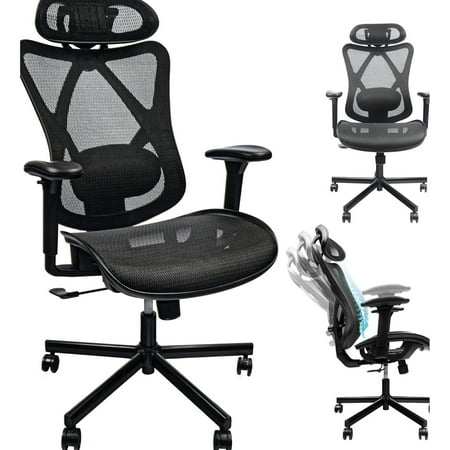
Where do you feel discomfort? Is it a dull ache in your lower back? Stiffness between your shoulder blades? Or sharp pain when you stand up? Your symptoms will guide your feature priorities. For lower back pain, adjustable lumbar depth is key. For upper back and neck pain, look for a chair with a tall backrest and an adjustable headrest.
Step 2: The "Two-Week" Test (If Possible)
Spinal comfort is deeply personal. A chair that feels amazing for 10 minutes might cause pain after two hours. If you're buying online, prioritize brands with a good return policy. When you first sit in a potential chair, pay attention to your lower back. Does the lumbar support hit the right spot? Can you feel your shoulders relaxing? Use the chair's adjustment period like you're tuning a musical instrument—make small changes and listen to your body.
Step 3: Look for Key Adjustment Points
A spine chair without adjustability is like a pair of glasses with the wrong prescription. Ensure it has at least:
- Seat height adjustment (pneumatic).
- Seat depth adjustment (sliding pan).
- Lumbar height AND depth adjustment.
- Backrest angle adjustment with tension control.
- 4D armrests (height, width, depth, and pivot).
The Hidden Connection: Armrests and Your Spine
Did you know poorly positioned armrests can cause "keyboard shrug" and neck pain? When your armrests are too high, you shrug your shoulders, compressing your cervical spine. Too low, and you slump, curving your thoracic spine. A spine office chair with fully adjustable armrests (4D) allows you to set them so your elbows rest at a 90-degree angle with shoulders completely relaxed. This preserves the natural curve of your upper spine and prevents trapezius muscle fatigue. Think of armrests not as a place to park your arms, but as a support system that offloads weight from your spine onto the chair's frame.
According to research from the National Institute for Occupational Safety and Health (NIOSH), combining ergonomic chairs with proper workstation setup can reduce work-related musculoskeletal disorders by up to 60%. A spine office chair is the cornerstone of that setup, acting as the foundation upon which your posture is built. By choosing a chair that works with your spine's natural mechanics, you're not just buying furniture; you're investing in a pain-free future.
Frequently Asked Questions About Spine Office Chairs
Conclusion: Your Back is Worth the Investment
Choosing a spine office chair is a profound act of self-care. It's acknowledging that your body deserves the same level of engineering and design as your computer or smartphone. By understanding the mechanics of spinal support—from the three-zone backrest to the dynamic tilt mechanism—you can make an informed decision that will pay dividends in comfort, productivity, and long-term health. Don't settle for a chair that just looks good; choose one that supports the 33 vertebrae that hold you up all day. Explore the recommended chairs above and take the first step toward a healthier, more comfortable work life.