
Why the Right Office Chair Matters for Neck Pain
Neck pain is one of the most common complaints among office workers. Poor posture, inadequate support, and prolonged sitting can lead to chronic discomfort that affects productivity and quality of life. The right office chair to help with neck pain can make a significant difference by promoting proper spinal alignment and relieving tension in the cervical spine.
Did you know? According to a study published in the Journal of Physical Therapy Science, ergonomic interventions, including proper seating, can reduce neck pain intensity by up to 35% in office workers.
Key Features of a Neck-Pain Relief Chair
When shopping for a chair to alleviate neck pain, prioritize these essential features:
- Adjustable Headrest: Supports the natural curve of your neck and prevents forward head posture.
- Dynamic Lumbar Support: Maintains the lower back's natural curve, reducing compensatory neck strain.
- 4D Armrests: Allow you to position arms and shoulders comfortably, reducing upper body tension.
- Seat Depth Adjustment: Ensures proper thigh support and pelvis alignment, which affects the entire spine.
- Recline Mechanism: Enables you to shift weight and change posture throughout the day, reducing static loading on the neck.
Understanding the Connection Between Posture and Neck Pain
Imagine your spine as a chain of building blocks. When one block (the lower back) is misaligned, the entire chain compensates, often causing the neck to strain forward. This "forward head posture" can add up to 10 pounds of extra pressure on the cervical spine for every inch the head moves forward. A well-designed chair acts as a foundation, keeping your pelvis and lumbar spine stable so your neck can relax naturally.
Reduces Muscle Tension
Proper support allows neck and shoulder muscles to relax, decreasing fatigue and pain.
Improves Concentration
Less pain means better focus and productivity throughout the workday.
Prevents Chronic Issues
Correct posture helps avoid long-term conditions like cervical spondylosis.
Promotes Better Breathing
An open chest and aligned neck improve lung capacity and oxygen flow.
Top Ergonomic Adjustments for Neck Relief
Even the best chair requires proper adjustment. Follow these steps to optimize your setup:
- Set the headrest: Position it so the curve supports the middle of your neck, not the back of your head.
- Adjust armrests: Set them so your shoulders are relaxed and your elbows form a 90-degree angle.
- Position the lumbar support: It should fit snugly into the curve of your lower back.
- Check seat depth: There should be 2-3 inches between the back of your knees and the seat edge.
- Recline slightly: A 100-110 degree recline reduces pressure on the spine and allows the headrest to support your neck.
Material and Build Considerations
The materials used in your chair also affect comfort and durability. Here’s a quick guide:
Mesh Backs
- Breathable and cool, ideal for long hours.
- Provides flexible support that adapts to your movements.
- Easier to maintain and clean.
Leather / Faux Leather
- Luxurious feel and professional appearance.
- Requires regular conditioning to prevent cracking.
- Can be less breathable than mesh.
Quick Comparison: Neck-Friendly Chairs
| Feature | Mesh Back Chair | Leather Executive Chair | High-Back Ergonomic Chair |
|---|---|---|---|
| Headrest | Yes, adjustable | Yes, often integrated | Yes, multi-angle |
| Lumbar Support | Dynamic, self-adjusting | Fixed or adjustable | Independent height/depth |
| Armrests | 3D or 4D | 2D or 3D | 4D with pivot |
| Best For | All-day comfort, warm climates | Executive offices, traditional look | Maximum adjustability, long hours |
Common Mistakes to Avoid
- Choosing style over function: A stylish chair won't help if it lacks proper support.
- Skipping the headrest: Many office chairs omit this, but it's critical for neck pain.
- Ignoring armrest adjustments: Fixed armrests can force your shoulders into an unnatural position.
- Not testing before buying: If possible, sit in the chair for at least 15 minutes to assess comfort.
Frequently Asked Questions About Office Chairs for Neck Pain
Conclusion & Final Recommendations
Choosing the right office chair to help with neck pain is a proactive step toward better health and productivity. By focusing on adjustability, support, and ergonomic design, you can significantly reduce discomfort and improve your overall work experience.
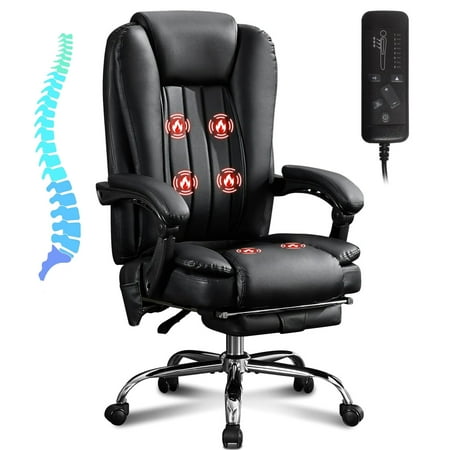
Opt for a high-back chair with a mesh back and 4D armrests. These provide breathability and maximum adjustability.
Leather chairs with integrated headrests and lumbar support offer a professional look while still addressing neck pain.
Look for chairs with at least a 2D headrest and adjustable lumbar support. Many mid-range options provide excellent value.
Remember, no chair can replace the need for regular movement and stretching. Incorporate short breaks into your routine to maximize the benefits of your ergonomic seating.